Administrative access in Cisco Meraki carries real weight. A single dashboard account can affect wireless policies, switch settings, firewall rules, VPN behavior, cameras, sensors, and organization-wide permissions. Remote access carries similar risk. If those entry points depend on passwords alone, the environment is exposed to phishing, password reuse, and weak credential hygiene.
Multi-factor authentication raises the standard at exactly the right points. It helps protect Meraki Dashboard administration, strengthens remote access, and gives security teams a better way to control how trusted access is granted. The strongest rollout usually starts with administrative accounts, then moves to remote access paths such as Client VPN.
A good Meraki MFA project begins with a short inventory. Which logins can change infrastructure? Which logins can reach internal systems from outside the network? In most environments, the first group includes Dashboard administrators. The second group includes Client VPN users, especially staff, contractors, and support personnel who connect to internal resources remotely.
These two groups deserve separate planning. Dashboard administrators are fewer in number and higher in impact. That makes them the right first phase. Client VPN users usually involve a larger audience, more variation in device readiness, and a different authentication flow. Breaking the rollout into two tracks keeps the project manageable.
This also helps with change control. Admin MFA can be tested with a small team, refined, and enforced before the broader user population sees any change at all. Once that part is stable, VPN MFA becomes much easier to design and support.
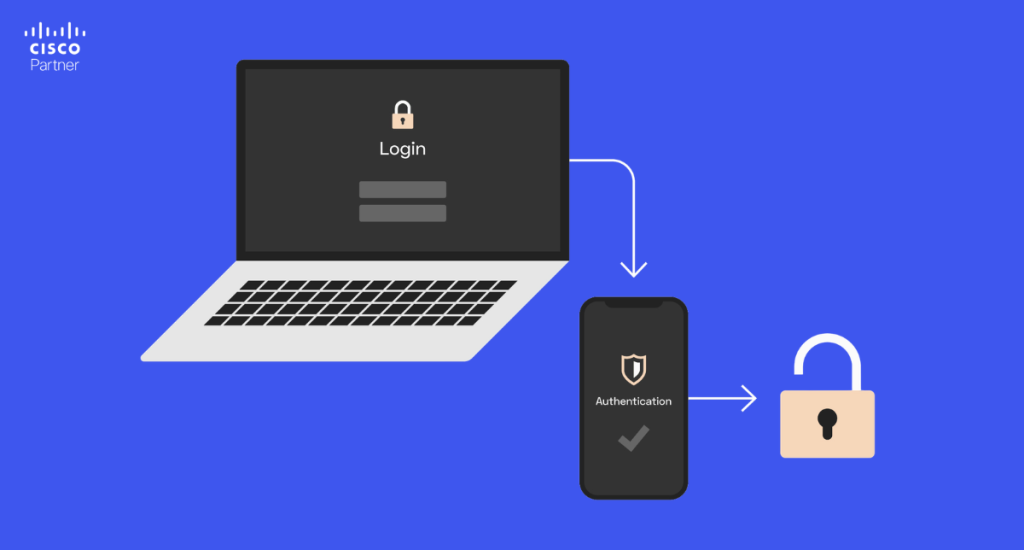
Cisco Meraki includes built-in two-factor authentication for Dashboard users. For many teams, this is the quickest way to strengthen security without redesigning the identity stack. A user signs in with a username and password, then completes the login with a code from an authenticator app. Recovery codes can be stored for emergency access if the primary device is lost or replaced.
This built-in method works well when Dashboard accounts are still managed locally, and the administrative group is relatively small. It improves protection quickly, does not require a full SAML project, and gives the business a meaningful reduction in password-only exposure.
The most important part of this rollout is enforcement. Optional MFA tends to create uneven coverage. One administrator enrolls immediately, another delays, and one critical account remains unprotected. Requiring MFA for Dashboard administrators closes that gap and gives the organization a consistent baseline.
Recovery planning belongs in the same phase. Teams should decide where backup codes will be stored, who owns account recovery, and how device replacement will be handled. Strong MFA becomes frustrating very quickly if the recovery side is improvised.
Built-in dashboard MFA is a strong starting point. Some organizations need a tighter model. They want Meraki access tied to the same identity system used across the rest of the business, with cleaner lifecycle control, better offboarding, and more consistent login policy.
That is where SAML single sign-on becomes more attractive. With SAML, Dashboard access is connected to the organization’s identity provider. User authentication, access reviews, and account changes can follow the same process already used for other business applications. This is often the better long-term path for larger environments, regulated organizations, or teams that want fewer standalone admin accounts.
SAML also makes it easier to align Meraki with broader security policy. If the business already uses central identity controls, device trust, and conditional access rules, Dashboard login should not remain an exception. A centralized sign-in model usually leads to cleaner administration over time.
Cisco Duo is an identity security platform used to add multi-factor authentication and access policy controls to sign-in workflows. In a Meraki environment, Duo is most often used in two places: SAML-based sign-in for Dashboard administrators and secondary authentication for Meraki Client VPN. That makes it a strong fit for organizations that want more control than a basic authenticator-code workflow.
Duo becomes especially valuable when Dashboard access needs to follow a broader identity strategy. In a SAML-based deployment, Duo can add a stronger second factor and more flexible policy decisions around who signs in, from what device, and under what conditions.
This is useful for organizations that want more than app-based codes. Security teams may want push approval, passkeys, hardware security keys, or device-based policy checks. They may also want to avoid managing Meraki as a separate login silo for administrators. Duo helps with that by fitting into a centralized access model rather than standing apart from it.
The operational advantage is just as important as the security advantage. When a user changes roles, leaves the company, or needs a new access policy, the identity team can handle that within the broader authentication system instead of maintaining a parallel process just for Meraki. For distributed organizations with many sites and several infrastructure administrators, that consistency matters.
A company does not need to choose between “simple” and “secure.” It needs to choose the model that fits its current identity maturity. Built-in Dashboard MFA is often the right first step. SAML with Duo is often the right next step when access governance becomes more important.
One of the easiest mistakes to make in Meraki security planning is assuming that Dashboard MFA protects remote access. It does not. Dashboard administration and Client VPN are separate access paths and need separate design decisions.
Meraki Client VPN can support MFA through a RADIUS-based workflow. In practice, this means the MX uses RADIUS for authentication, and the second factor is applied through the identity platform sitting behind that flow. Duo is a common choice because it can add push-based approval, passcodes, and related controls while still allowing the MX to remain the VPN gateway.
This matters most in hybrid and remote work environments. If a password is exposed, password-only VPN access gives an attacker a direct chance to test that credential against a live entry point into the network. MFA adds another barrier and makes credential theft much less useful.
The user experience should be planned carefully. VPN MFA should be explained clearly, tested with real users, and rolled out with support documentation already prepared. A security improvement works best when the help desk understands the login flow before the first ticket arrives.
These options are not competing ideas. They solve different parts of the same problem.
Built-in Dashboard MFA is a strong fit when:
SAML with Duo is a stronger fit when:
VPN MFA is essential when:
A mature Meraki security design often uses more than one of these. Dashboard admins may use SAML and Duo. VPN users may authenticate through a separate RADIUS-based MFA flow. The point is to match the method to the access path instead of forcing one approach onto everything.
MFA projects are judged by what happens when something goes wrong. A lost phone, a replaced device, a failed enrollment, or an unreachable second factor can turn a good security rollout into a support problem if the recovery design is weak.
That means recovery should be planned before enforcement begins. Dashboard administrators need a documented process for backup codes and device replacement. Identity teams and Meraki administrators need a clear owner for SAML sign-in problems. VPN support staff need to know how to tell primary-authentication failure from second-factor failure.
Recovery is not a side issue. It is part of the security control itself. If users can only regain access by bypassing policy or calling the one person who happened to set up the system months ago, the rollout is fragile. A strong process is documented, repeatable, and easy for the right team to operate.

The first common mistake is protecting one access path and ignoring another. Dashboard MFA helps, but it does nothing for VPN access. VPN MFA helps, but it does not protect administrative sign-in. Both deserve attention.
The second mistake is choosing the wrong model for the organization’s maturity. A smaller team may not need SAML right away. A larger enterprise may outgrow local Dashboard MFA quickly. The method should fit the operating model, not follow a generic preference.
The third mistake is weak enforcement. If MFA is available but not required, gaps remain. If the team does not review access periodically, old accounts and stale permissions stay behind. Access control only stays strong if it is maintained.
The fourth mistake is poor communication. Users need clear enrollment steps, clear recovery instructions, and a clear support path. Security projects create far less friction when people know what will change and how to handle normal issues such as phone replacement or re-enrollment.
A useful rollout usually follows this order:
This order keeps the project controlled and reduces support friction. It also gives the organization a chance to improve security quickly while still leaving room for a more advanced identity model later.
Adding multi-factor authentication to Cisco Meraki improves security where it matters most: administrative access and remote entry points. Native Dashboard MFA is a strong first step for many teams. SAML with Duo is often the better long-term fit for organizations that want centralized identity control. VPN MFA closes a separate gap that should not stay open in a modern environment.Stratus Information Systems helps businesses strengthen Cisco Meraki environments across wireless, switching, security appliances, and remote access. If your team is planning an MFA rollout for Dashboard administrators, a SAML migration, or stronger protection for Meraki Client VPN, a structured deployment can improve security without adding unnecessary friction.