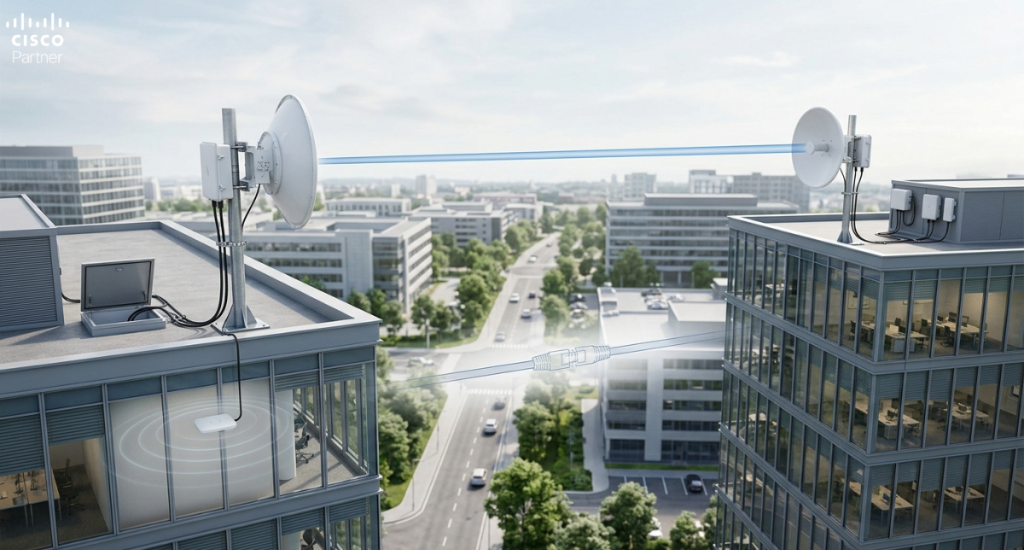
Many organizations have facilities spread across multiple buildings. Headquarters and a warehouse. Main office and a satellite location. Campus-style deployments with buildings separated by hundreds of feet or miles. Connecting these locations requires network infrastructure, but wired connections aren’t always practical or affordable.
Fiber optic cables are expensive to install, requiring trenching, conduit, and professional installation costing thousands per building connection. Leased lines from ISPs provide alternatives but carry monthly costs and provider dependency. Satellite connectivity works anywhere but introduces latency and bandwidth limitations unsuitable for business-critical applications.
Wireless point-to-point connectivity offers a middle ground: extend network coverage between buildings using directional antennas and wireless bridges. The Cisco Meraki system supports this approach, enabling organizations to create multi-building networks without extensive wired infrastructure or ongoing carrier costs.
Understanding how point-to-point wireless works, when it makes sense, and how to implement it properly helps organizations connect distributed facilities cost-effectively and reliably.
Understanding Point-to-Point Wireless
Point-to-point wireless is fundamentally different from typical WiFi deployment.
WiFi vs. Point-to-Point Differences
WiFi (Access Points):
- Omnidirectional antennas broadcasting in all directions
- Coverage pattern like concentric circles
- Multiple devices connect to single access point
- Medium range (50-150 feet typical)
- Designed for mobile clients moving freely
Point-to-Point:
- Directional antennas focusing signal toward specific target
- Coverage pattern like narrow beam
- Dedicated link between two locations
- Long range (1-10+ miles possible)
- Fixed endpoints with stationary antennas
Point-to-point creates a wireless bridge between two locations, functioning like an invisible Ethernet cable connecting the buildings.
Organizations with multiple facilities face connectivity challenges:
- Distance beyond WiFi range – Buildings too far apart for WiFi
- Wired infrastructure cost – Trenching and fiber installation expensive
- Speed requirements – Need backhaul bandwidth for multiple buildings
- Reliability requirements – Can’t rely on public internet connections
Point-to-point wireless addresses these challenges by creating high-capacity links between buildings without expensive physical infrastructure.
How Meraki Point-to-Point Works
Basic Architecture
Meraki point-to-point uses two directional antennas creating wireless link:
- Access point with directional antenna at Location A
- Bridge antenna at Location B receiving signal
- Wireless bridge link connecting both locations
- Ethernet connection carrying traffic across the link
The wireless bridge is transparent to connected devices—data flows across the link like any wired connection.
Why This Matters for Multi-Building Organizations
Signal Characteristics
Point-to-point wireless uses 5GHz band (typically):
- Frequency: 5GHz band (regulatory-approved frequencies)
- Bandwidth: Up to 80 MHz channels (depending on location)
- Modulation: Modern modulation achieving high data rates
- Range: 1-10+ miles depending on conditions
- Throughput: 100+ Mbps achievable in ideal conditions
The 5GHz band provides:
- Higher bandwidth than 2.4GHz
- Less interference from WiFi and other devices
- Better range in line-of-sight conditions
- Suitable for point-to-point links
Line of Sight Requirement
Point-to-point links require relatively clear line of sight between antennas:
- Direct line of sight: Best performance
- Near line of sight: One antenna slightly above/below direct path—acceptable
- Obstructed paths: Trees, buildings blocking signal—poor performance or no connection
Before committing to point-to-point deployment, verify line of sight exists or can be achieved.

Point-to-Point Capabilities
Range
Meraki point-to-point antennas can achieve impressive distances:
- Ideal conditions (clear line of sight, professional installation): 5-10+ miles
- Good conditions (minor obstructions): 2-5 miles
- Marginal conditions (vegetation, some obstacles): 0.5-2 miles
- Poor conditions (heavy obstruction): May not work at all
Distance depends on:
- Antenna quality – Directional gain affects range
- Transmit power – Licensed or unlicensed power levels
- Line of sight – Direct path vs. obstructed
- Frequency band – 5GHz has excellent range in good conditions
- Environmental factors – Rain, snow, humidity affect signal
Real-world range is typically 2-5 miles for most deployments in moderate conditions.
Throughput
Achievable bandwidth depends on link conditions:
- Ideal conditions: 100-300 Mbps sustained
- Good conditions: 50-150 Mbps sustained
- Marginal conditions: 10-50 Mbps sustained
This throughput is shared between all devices using the link. If multiple buildings connect through single link, bandwidth is divided.
Reliability
Point-to-point links typically achieve:
- Availability: 99%+ uptime in good conditions
- Latency: 10-30ms typical (excellent for business applications)
- Consistency: More reliable than WiFi in same building
Environmental factors affect reliability:
- Rain: Heavy rain attenuates 5GHz signal
- Snow/ice: Accumulation on antennas degrades performance
- Seasonal changes: Leaf growth in spring affects paths through vegetation
- Temperature: Extreme cold/heat affects equipment
Meraki Point-to-Point Components
Access Point with Directional Antenna
Meraki access points support directional antenna attachment:
- Standard Meraki access point (like MR34)
- Directional antenna (typically 16-20 dBi gain)
- PoE power injection
- Outdoor mounting hardware
- Ethernet cable to network infrastructure
The access point functions normally except antenna focuses signal toward specific direction.
Bridge or Receiver Antenna
The receiving end typically uses:
- Another Meraki access point with directional antenna (full bridge), OR
- Passive directional antenna with separate bridge appliance
- Similar PoE power requirements
- Mounting hardware for secure installation
- Ethernet connection to building network
Supporting Infrastructure
Successful point-to-point deployment requires:
- Antenna mounting – Roof, tower, pole, or building face
- Weatherproofing – Sealed connectors, grounding, lightning protection
- Power delivery – PoE+ or higher power to support long cable runs
- Cable runs – Appropriate gauge Ethernet cable for distance
- Lightning protection – Grounding and surge protection
- Professional installation – Proper mounting and alignment critical
Planning Point-to-Point Deployment
Step 1: Assess Feasibility
Before committing to deployment:
- Verify line of sight
- Can you draw direct line between antenna locations?
- Do obstructions exist? (buildings, trees, terrain)
- Can antennas be mounted high enough to achieve line of sight?
- Measure distance
- How far apart are locations? (miles or kilometers)
- Does distance fall within equipment capability?
- Will distance require long cable runs?
- Identify mounting locations
- Where can antennas be mounted? (roofs, towers, poles)
- Are locations accessible and secure?
- Do buildings allow exterior antenna installation?
- Check regulations
- Are frequencies licensed or unlicensed in your country?
- Do regulations limit transmit power?
- Are building codes or zoning restrictions relevant?
Step 2: Calculate Link Budget
Link budget calculation determines if connection is feasible:
- Transmit power – Output power from source equipment (dBm)
- Antenna gain – Both source and receiver antenna gain (dBi)
- Path loss – Signal loss over distance (dB)
- Cable loss – Signal loss in cables and connectors (dB)
- Receiver sensitivity – Minimum signal receiver can detect (dBm)
The sum must show received signal strength above receiver sensitivity with margin for safety.
Professional installers perform this calculation. Organizations can use online calculators or spreadsheets.
Step 3: Select Equipment
Based on feasibility assessment:
- Antenna type – Parabolic dish, directional patch, or others
- Antenna gain – Higher gain = more focused but narrower beam
- Access point model – Support directional antenna attachment
- Power requirements – PoE+ or additional power injection
- Mounting hardware – Appropriate for installation location
Different scenarios require different equipment. Professional guidance is valuable.
Step 4: Plan Installation
Professional installation is critical:
- Site survey – Visit both locations, verify line of sight, confirm mounting options
- Equipment procurement – Order based on survey findings
- Installation planning – Coordinate access, scheduling, safety
- Weather planning – Avoid installation during severe weather
- Testing and alignment – Verify connection and optimize signal strength
Proper installation directly affects reliability and performance.
Installation Considerations
Mounting Heights
Higher antenna placement improves performance:
- Rooftop mounting – Highest point, best performance
- Pole mounting – Tower or pole elevating antenna
- Building face – Exterior wall mounting at high point
- Interior window – Lowest performance but simplest if line of sight possible
Rooftop mounting typically provides best results.
Weatherproofing
Outdoor equipment must handle weather:
- Sealed connectors – Prevent water ingress
- Grounding – Lightning protection critical
- Cable protection – UV-resistant outdoor cable
- Antenna caps – Radome protection on some antennas
- Regular maintenance – Inspect for weather damage
Poor weatherproofing causes failure and creates safety hazards.
Safety Considerations
Antenna installation involves safety risks:
- Fall hazards – Working at height on roofs or towers
- Lightning risk – Tall antennas attract lightning
- RF exposure – Transmitting antennas create RF fields
- Cable pinch points – Heavy cables under tension
Professional installers understand and mitigate these risks.
Cable Runs
Long cable runs introduce signal loss:
- Cable type – Low-loss coaxial cable required (not standard Ethernet)
- Cable length – Long runs require thicker cable
- Connections – Sealed connectors at antenna
- Strain relief – Proper cable support and protection
Cable quality directly affects performance.
Configuration and Alignment
Initial Configuration
After physical installation:
- Power on equipment
- Verify lights indicate power and connectivity
- Allow boot-up time (2-5 minutes)
- Configure in Meraki dashboard
- Add access points to organization
- Name descriptively (“Building A to B Link”)
- Set channel and power appropriately
- Configure security (WPA2/3)
- Verify connectivity
- Check dashboard shows link connected
- Verify signal strength (typically -60 to -80 dBm acceptable)
- Test throughput with speed test
Antenna Alignment
Proper alignment optimizes performance:
- Rough alignment – Point antenna toward target location
- Fine tuning – Adjust azimuth (left/right) and elevation (up/down)
- Signal strength monitoring – Watch signal strength as adjusting
- Peak optimization – Find position with strongest signal
- Lock in position – Secure antenna once optimized
Small adjustments (1-2 degrees) can significantly affect performance.
Channel Selection
Choose 5GHz channel carefully:
- Non-overlapping channels – 36-48 or 149-165 typically best
- Regulatory compliance – Respect regional channel restrictions
- Interference avoidance – Scan for other wireless devices
- Bandwidth – 80 MHz channels provide more throughput
Professional installers scan for interference and recommend appropriate channels.
Troubleshooting Point-to-Point Links
No Connection
Causes:
- Equipment not powered
- Antenna misaligned
- Line of sight obstructed
- Wrong channel configured
- Equipment failure
Solutions:
- Verify power indicators on both ends
- Check antenna alignment visually
- Confirm line of sight (no new obstructions)
- Verify channel matches on both ends
- Restart equipment
Poor Signal Strength
Causes:
- Misalignment (even 2-3 degrees affects signal)
- Obstructions appeared (new trees, construction)
- Cable or connector damage
- Weather conditions (rain attenuates signal)
- Equipment degradation
Solutions:
- Fine-tune antenna alignment
- Check for new obstructions
- Inspect cables and connectors
- Weather typically resolves itself
- Contact vendor for equipment testing
Intermittent Connectivity
Causes:
- Marginal signal strength (just above minimum)
- Weather-related fading
- Interference from other sources
- Equipment overheating
- Firmware issues
Solutions:
- Improve antenna alignment if possible
- Accept weather-related performance variation
- Scan for interference sources
- Ensure adequate ventilation and cooling
- Update firmware to latest version
Low Throughput
Causes:
- Poor signal conditions (forces lower modulation)
- Many devices using link (bandwidth shared)
- Interference reducing usable bandwidth
- Downstream network bottleneck
Solutions:
Check downstream network capacity
Improve antenna alignment to strengthen signal
Limit devices sharing link
Identify and mitigate interference

Point-to-Point vs. Alternatives Comparison
| Solution | Throughput | Cost | Installation | Reliability | Range |
| Point-to-Point Wireless | Medium (50-150 Mbps) | Low ($2-5K) | Moderate | Good | 2-5 miles |
| Fiber Optic Cable | High (1+ Gbps) | Very High ($5-15K+) | Complex | Excellent | Any distance |
| Leased Line | Medium (10-100 Mbps) | High ($500-2K/month) | Moderate | Good | Any distance |
| WiFi Bridge | Low (5-25 Mbps) | Very Low ($500-1K) | Simple | Fair | 300+ feet |
| Satellite | Low (varies) | High ($500-2K/month) | Simple | Fair | Anywhere |
Point-to-point wireless excels at moderate distances with budget constraints.
When Point-to-Point Makes Sense
Choose point-to-point when:
- Buildings 0.5-5 miles apart
- Clear line of sight achievable
- Medium bandwidth requirements (not gigabit)
- Budget constrained
- Professional installation available
- Uptime acceptable (99% not critical)
Choose fiber when:
- Gigabit throughput required
- 99.99%+ uptime mandatory
- Long-term permanent connection
- Any distance (can reach anywhere)
- Cost not primary constraint
Choose leased line when:
- Provider service available
- Guaranteed SLA required
- Pay-as-you-go preferred
- Professional provider support needed
Best Practices for Point-to-Point
Installation
- Use professional installers experienced with outdoor wireless
- Perform site survey before committing to equipment
- Calculate link budget before purchasing
- Plan for maintenance access
- Weatherproof thoroughly
- Ground for lightning protection
Maintenance
- Regular visual inspection (quarterly)
- Clean antenna and connectors periodically
- Monitor signal strength continuously
- Document performance baselines
- Have spare equipment available
- Update firmware regularly
Optimization
- Fine-tune alignment for best signal
- Monitor interference periodically
- Adjust power levels appropriately
- Use quality Ethernet cable
- Maintain adequate cable slack for expansion
- Plan for seasonal changes
Getting Help with Point-to-Point Deployment
Successful point-to-point wireless requires site-specific expertise and professional installation. Stratus Information Systems helps organizations evaluate and deploy point-to-point solutions including:
- Site survey and feasibility assessment
- Link budget calculation and equipment recommendation
- Professional installation and antenna alignment
- Configuration and optimization
- Ongoing monitoring and support
- Network design services for multi-building architecture
Point-to-point wireless represents cost-effective connectivity solution for organizations with multiple facilities. When properly designed, installed, and maintained, these links provide reliable backhaul connecting distributed locations without expensive wired infrastructure or ongoing carrier costs.
The key is treating point-to-point wireless as engineered solution requiring professional expertise—not as simple WiFi deployment. Corners cut in planning, installation, or maintenance typically result in poor performance and unreliability.
Contact Stratus to discuss point-to-point wireless for connecting your facilities.