Your CEO walks into your office and says: “We need to be AI-ready.”
That’s the entirety of the scope they give you.
No budget breakdown. No timeline. No definition of what “AI-ready” actually means. Just: make it happen, and make it happen yesterday. If you’re the IT leader at a mid-market organization, you’ve probably had this conversation already—or you’re dreading the day it comes.
The problem is that everyone has an opinion about AI readiness. Vendors tell you that you need 50-terabit infrastructure built for hyperscaler training clusters. Consultants suggest exotic solutions costing millions. Industry analysts publish studies claiming you’ll need massive infrastructure investments. Meanwhile, your CEO read something on an in-flight magazine and now everything is urgent.
The reality for mid-market organizations is different. You don’t need the infrastructure built for training artificial intelligence models. You need infrastructure supporting business applications using AI—which is an entirely different problem with entirely different solutions.
This guide provides five concrete steps for making your network actually AI-ready based on measured reality rather than vendor hype or CEO anxiety.
Before diving into the steps, it’s worth understanding what AI-ready actually means for organizations your size.
The Hyperscaler Misconception
You’ve probably heard about the massive investments cloud providers and AI companies are making in infrastructure. AWS, Microsoft, and Google are spending billions on data centers, GPUs, and networking infrastructure capable of supporting trillion-parameter models and massive training workloads.
But here’s the critical insight: that infrastructure is completely different from what mid-market organizations need.
Hyperscalers are building infrastructure to train AI models a specialized, computationally intensive task requiring unprecedented bandwidth and processing power. Mid-market organizations aren’t training models. You’re using models—running applications that leverage AI for business purposes.
The applications are different. The infrastructure requirements are different. And most importantly, the costs are completely different.
What Mid-Market AI Actually Looks Like
According to real conversations with mid-market customers, AI use cases are surprisingly operational:
These aren’t department-replacing transformations. They’re productivity enhancements—meaningful applications but fundamentally different from the hyperscaler infrastructure narrative.
Why This Matters for Your Network
These applications create different network demands than hyperscaler workloads. Instead of massive data throughput from training clusters, you get:
The data itself hasn’t changed. The volume of data hasn’t fundamentally changed. The speed and frequency of data access is what’s transforming.
This distinction is critical because it means your network strategy should focus on measured workload assessment rather than speculative infrastructure buildout.
The first step toward AI readiness is understanding where AI is already present in your organization—because it definitely is, whether you’re managing it or not.
The Shadow AI Problem
Employees are already using public AI tools. ChatGPT, Claude, Gemini, Copilot—your team members are using these before IT has a strategy, before security has a plan, and before anyone has evaluated the risks.
This shadow AI usage represents the biggest vulnerability and the most important area to address first.
Why This Matters
When employees paste sensitive data into public AI tools, several things happen:
The employees doing this aren’t being malicious. They’re trying to get work done. But without guidelines, visibility, and secure alternatives, they’re creating massive risk.
What to Do
Tools for Inventory
This inventory becomes your starting point. You’re not restricting AI usage yet—you’re simply understanding what’s actually happening.
Once you understand existing AI traffic, the next step is isolating it so you can measure its characteristics and impact.
Why Segmentation Matters
Unless your organization has exceptional network infrastructure, AI traffic is probably running parallel with your regular business traffic. They’re sharing bandwidth, competing for network resources, and making it impossible to understand which traffic is consuming resources.
Segmentation creates visibility by isolating AI-related traffic so you can:
How to Segment
Network-level segmentation:
Application-level segmentation:
User-level segmentation:
What to Measure
Once segmented, measure:
This baseline becomes your reference point for future planning.
With baseline data in hand, you can now make informed decisions about infrastructure sizing—actual sizing based on measured data rather than theoretical specifications.
The Measurement Approach
The biggest mistake organizations make is building infrastructure based on hypothetical future scenarios. Instead:
This is radically different from the vendor approach of “you’ll need massive infrastructure so buy everything now.”
WAN Considerations
Your WAN connection carries traffic to cloud services and SaaS applications. AI workloads increase this traffic:
Example: If current WAN consumption is 200 Mbps, AI adds 50 Mbps, and you project 20% growth, you need 200 + 50 + (250 × 0.20) = 300 Mbps capacity. A 500 Mbps connection provides appropriate headroom without overkill.
Edge Infrastructure
Edge devices (routers, firewalls, access points) need capacity handling AI traffic:
Right-size based on measured requirements, not vendor specifications.
What NOT to Do
The Measurement Reality
Here’s what most mid-market organizations discover: their current infrastructure can handle AI workloads with appropriate segmentation and monitoring. The need for massive upgrades is usually overstated.
Sometimes you do need upgrades. But base that decision on your actual data, not on vendor marketing or industry hype.
AI-driven applications often rely on wireless connectivity. Remote workers using AI-enhanced applications stress WiFi networks differently than traditional applications.
WiFi 7 Implications
WiFi 7 represents a significant upgrade in capability, but it comes with infrastructure requirements many organizations miss:
WiFi 7 speed requirements:
Routing implications:
Why This Matters for AI
AI applications are often latency-sensitive and bandwidth-intensive. Poor wireless performance directly impacts application performance.
Organizations that deploy WiFi 7 access points on gigabit switches often get surprised by performance issues. The access point supports speeds the network can’t deliver.
Wireless Refresh Strategy
Routing Refresh
Older routing infrastructure may not support:
If your routing infrastructure is 5+ years old, evaluate whether modern features would improve reliability and performance.
This step is perhaps the most important: establish visibility into your network before making major infrastructure investments.
Why Observability Comes First
When you can’t see what’s happening on your network, you can’t make informed decisions about what needs to be fixed. Observability provides that visibility.
The Cost of Missing Observability
Organizations often skip this step because it feels like overhead. They want to deploy security controls, upgrade infrastructure, implement policies.
But without observability, they’re making decisions blind. They might:
What Observability Includes
Network visibility:
Performance monitoring:
Security visibility:
Tools for Observability
Cisco offers comprehensive observability through:
The key is consolidating visibility in one platform rather than fragmenting across multiple tools. When everything feeds into one system, correlation is easier and decisions are better informed.
Implementation Approach
The five steps above transform “make us AI-ready” from vague mandate into concrete plan:
This approach is fundamentally different from the vendor-driven approach of “buy everything now.”
The most important principle throughout this process: make everything measurable and quantifiable.
Don’t rely on:
Do rely on:
The Stratus Approach
This is exactly what network assessments are designed to accomplish. A proper assessment:
This converts vague mandates into concrete, defensible plans.

Throughout this process, security must be central—not an afterthought.
The Core Risk
The biggest concern with AI isn’t the technology itself. It’s protecting the data AI has access to. Data is only valuable to the AI if it’s accessible, which means data protection must be part of your AI-ready strategy from the start.
Practical Risks
Security Controls
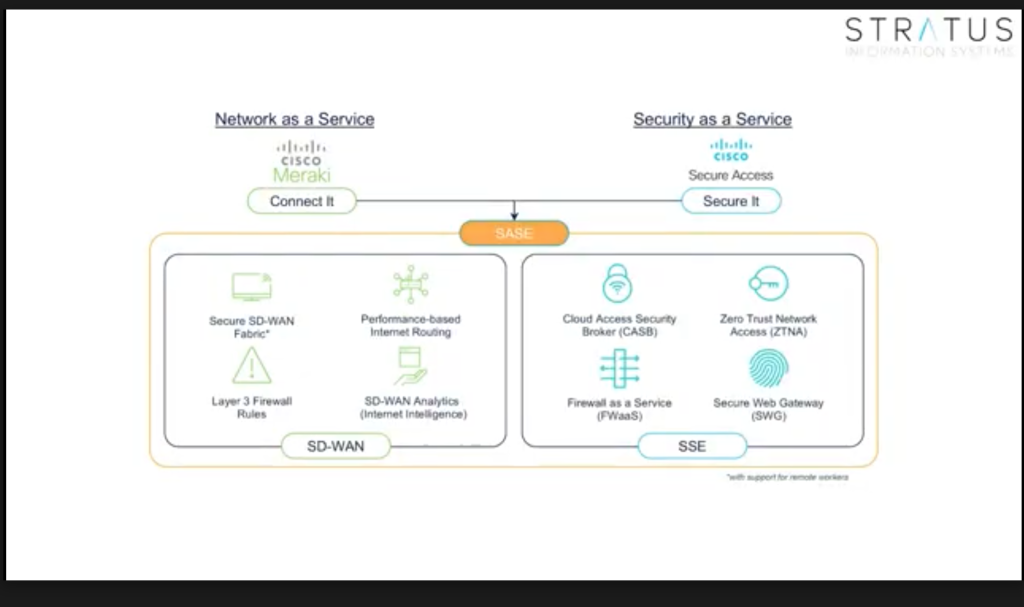
Implementing modular security solutions like Secure Access provides:
Combined with extended detection and response (XDR) services, this creates proactive threat detection and response.
Making your network AI-ready doesn’t require massive capital investment or exotic infrastructure. It requires:
For organizations ready to get serious about AI readiness, Stratus Information Systems provides free AI readiness assessments helping you understand your current infrastructure, identify gaps, and build practical roadmaps.
An assessment takes the vague executive mandate and converts it into concrete, measurable, actionable plans. You walk away with clear understanding of:
This is the foundation of effective AI infrastructure not hype, not speculation, but measured, quantifiable plans aligned with your actual requirements.
Your CEO wants you AI-ready. But AI readiness built on guesswork and vendor hype creates waste and risk. AI readiness built on measurement and analysis creates actual capability.