The Meraki MX series represents a unified class of security and networking appliances that combine firewall, SD‑WAN, VPN, and cloud‑managed controls into a single platform. With remote and branch offices proliferating, enterprises, retail chains, and educational institutions increasingly rely on cloud‑managed firewalls rather than disparate hardware silos. These appliances deliver real‑time visibility, centralized policy enforcement, and simplified network operations from the cloud‑based Meraki Dashboard.
In distributed environments where speed, scale, and security matter, Meraki MX appliances provide an all‑in‑one solution that integrates branching, remote access, and site‑to‑site connectivity. For organizations facing multiple locations, mixed WAN links, and hybrid cloud requirements, the MX architecture supports consistent security across environments. The combination of SD‑WAN, site‑to‑site VPN, and next‑generation firewall (NGFW) functionality positions it as a key tool to support modern business demands.
The appeal of the MX series lies in its simplicity and time‑to‑value. Organizations using Meraki MX models can deploy networks with minimal manual configuration, gain operational insights quickly, and reduce total cost of ownership through a cloud‑managed firewall model. For IT teams, this means less time spent on device‑by‑device configuration, fewer firmware upgrades to manage, and more time on innovation rather than maintenance.

The traditional deployment of firewalls and VPN appliances across distributed sites often results in high operational overhead, inconsistent policy enforcement, and delayed rollouts. With cloud‑managed firewall models from the Meraki MX family, network administrators gain a single dashboard for configuration, monitoring, and firmware updates across all locations. This centralized visibility reduces manual errors and supports a uniform security posture.
Deploying new sites or remote offices becomes faster with Meraki MX appliances. Auto VPN and SD‑WAN features enable branch sites to connect automatically to a hub or to each other without complex tunneling or routing configuration. Because the Meraki cloud manages policy updates and firmware patches remotely, IT teams can minimize on‑site intervention, eliminating the need for local IT expertise at each location.
Operational costs fall when organizations adopt a cloud‑managed firewall. The Meraki MX platform reduces hardware sprawl, lowers staffing burden, and simplifies lifecycle management of devices. In addition, many typical pain points, such as manual VPN setup, device staging, and patch scheduling, are handled automatically. Real‑time alerts, dashboards, and simplified remote access help IT teams stay ahead of issues rather than responding reactively. With centralized control via the Meraki Dashboard, managing the Meraki MX VPN across multiple sites takes just minutes, even for large enterprises.
Choosing the right Meraki MX model depends on the size of your site, expected throughput, number of users, and desired WAN connectivity. For small branch offices or teleworker sites, models such as the MX67, MX68, or Z4 serve well. These units provide Auto VPN, basic next‑generation firewall capability, and a connection for up to roughly 50 users. If Pope or integrated Wi‑Fi is desired, the MX68W or similar variants deliver additional value.
For growing sites and mid‑sized offices, the MX75, MX85, and MX95 models become appropriate. These devices support higher firewall throughput, greater VPN tunnel capacity, and more advanced SD‑WAN functionality. They fit environments with multiple uplinks, SFP or 10Gb interfaces, and larger user counts, typically from 200 to 500 users. Organizations needing PoE support or integrated routing may select specific SKUs accordingly.
Large enterprises, data centers, or campus environments require top‑tier appliances like the MX250, MX450, or the C8455 models. These units offer multi‑gigabit firewall throughput, thousands of VPN tunnels, and support for advanced security licenses. They enable hub‑and‑spoke architectures, full mesh deployments, and high‑performance NGFW operations. Key considerations include uplink capacity, heat/power constraints, and site‑to‑site redundancy.
When comparing Meraki MX models, evaluate client capacity, uplink fail‑over capabilities, PoE availability, LAN vs WAN port counts, and the impact of advanced security features on throughput. These factors support the selection of the right model.
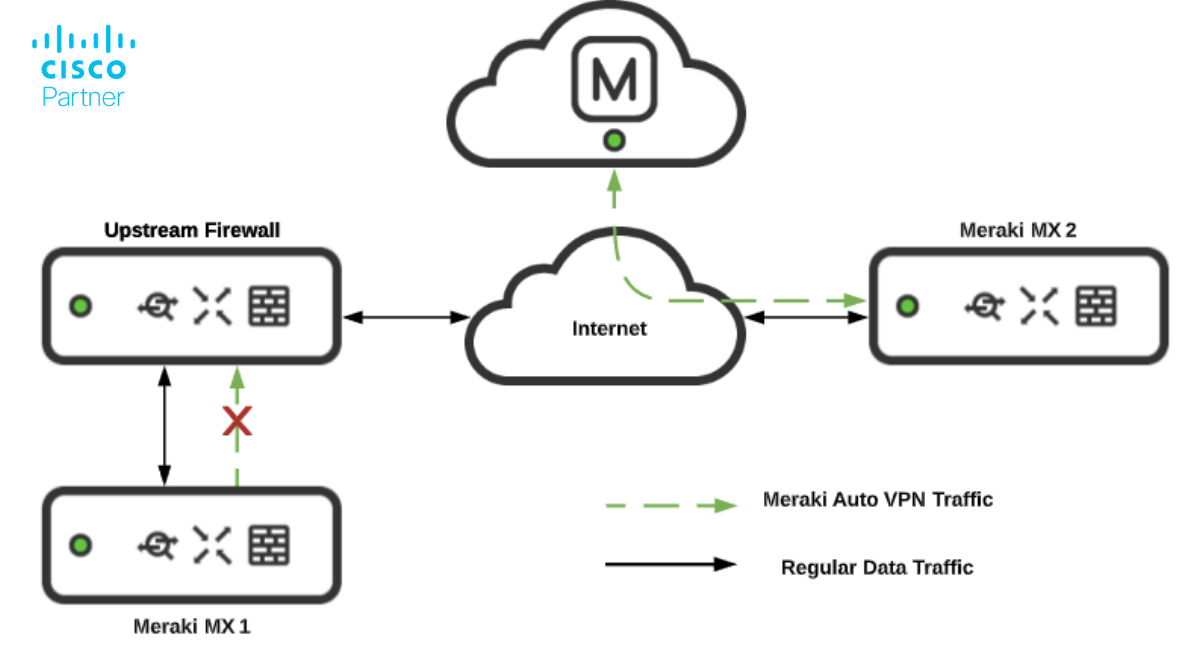
Meraki VPN, especially Auto VPN, stands out for its simplicity in setting up secure tunnels across multiple sites. Using just a few clicks in the Meraki Dashboard, administrators can create site‑to‑site IPsec tunnels or client VPN links without manual router or firewall configuration. The service uses automatic keying and configuration templates to reduce deployment complexity and speed time‑to‑connect. The Meraki MX VPN solution simplifies complex multi-site connectivity, enabling secure, automated tunnels between branches without manual configuration.
Meraki SD‑WAN elevates network performance by intelligently routing traffic based on application behavior, link quality, and policy. SD‑WAN enables differential treatment for SaaS traffic, lower priority for bulk backup traffic, and high priority for VoIP or video. The system can detect latency or packet loss on a link and reroute traffic to optimize end‑user experience. Auto VPN includes multipath support and failover that can switch in less than a second when configured correctly.
Site-to-site VPN throughput and user access are key in modern deployments. Many Meraki MX models offer multiple WAN links, automatic fail‑over, load balancing, and integrated traffic flow analytics. These features help distributed organizations maintain connectivity, control costs, and deliver predictable performance across branches and cloud environments.
The Meraki MX firewall forms the foundation of the appliance. It supports Layer 3 and Layer 7 inspection, NAT, VLANs, VLAN segmentation, and stateful packet inspection. Sliding in next‑generation firewall (NGFW) capabilities, it also supports advanced malware protection (AMP) with real‑time threat classification and sandboxing powered by Cisco TALOS intelligence. Content filtering, application analytics, and control reinforce the security posture.
Intrusion prevention and detection (IPS/IDS), built on Cisco Snort technology, provides deep packet inspection and threat mitigation. The advanced security license unlocks these features. HTTPS inspection, enforcement of policy by user identity or device type, and granular rule sets become available at this level. Organizations subject to compliance mandates (PCI‑DSS, HIPAA, etc.) benefit from these hardened controls built into MX models.
Firewall throughput can vary depending on the model and enabled features. Enabling a full NGFW stack, such as AMP, IPS/IDS, HTTPS inspection, and content filtering, may reduce throughput compared to basic firewall mode. It becomes critical to choose the right model supporting both performance and the intended security feature set. Meraki MX firewall licensing tiers govern which feature sets are available and how they impact performance.
By combining firewall and SD‑WAN functionality into a single appliance, organizations reduce costs and complexity compared to deploying separate routers, firewalls, and VPN concentrators. The Meraki MX series acts as a cloud‑managed firewall trusted for enterprises that need secure networking with scale.
Selecting between Meraki Enterprise and Advanced Security licenses shapes your feature access and cost profile. Enterprise licenses provide a full cloud‑managed firewall, Auto VPN, SD‑WAN routing, layer‑7 traffic shaping, and essential visibility tools. For many distributed branch deployments, this offers strong value.
Advanced Security licenses add next‑generation firewall services. Expect malware protection, IPS/IDS, content filtering, and advanced threat analytics. For organizations demanding deep inspection, regulatory compliance, and granular policy control, the advanced tier becomes critical.
Licensing is on a per‑device basis. Each Meraki MX security appliance requires its own license regardless of hot‑standby or warm‑spare configurations. Licenses include 24×7 Meraki support, cloud‑dashboard access, and ongoing firmware updates. When ordering through a partner such as Stratus Information Systems, customers can gain guidance on the correct tier, migration planning, and future‑proofing their network.
Correct sizing of a Meraki MX security appliance depends on throughput requirements, number of users/devices, VPN tunnels, and security feature load. Manufacturer data shows that small-branch MX67-class models support hundreds of Mbps of firewall throughput and tens of tunnels. Larger models, such as MX250, enable multiple gigabits of throughput and thousands of tunnels.
Feature‑enablement impacts performance. For example, enabling AMP, IPS/IDS, or HTTPS inspection will reduce throughput compared to base firewall mode. It is important to budget for current load and future growth. The Meraki sizing guide suggests considering metrics such as maximum concurrent VPN tunnels, site‑to‑site VPN throughput, and NGFW throughput when comparing MX models. For organizations requiring consistent uptime and remote access, the Meraki MX VPN offers a reliable, scalable solution with built-in high-availability features.
Another factor is WAN infrastructure. Many MX models support dual WAN, 10Gb SFP+ uplinks, or PoE availability. Ensure the selected model matches the site’s uplink architecture and the required reliability for SD‑WAN or load‑balancing scenarios. Proper selection avoids bottlenecks and enables the Meraki VPN paths to maintain performance.
While Meraki MX appliances serve distributed network environments effectively, some enterprises with large stateful firewall clusters or MPLS‑centric architectures may evaluate alternatives such as Cisco ASA or Cisco Viptela. ASA platforms often demand on‑site expertise, manual configuration, and separate management layers. Meraki MX family stands out by offering fully cloud‑managed infrastructure, consistent policies, and reduced manual overhead.
Viptela (now part of Cisco SD‑WAN) offers tremendous flexibility for service providers and large campus networks; however, it introduces significantly more complexity and operational overhead. Meraki MX models particularly shine in multi‑site enterprise networks that require centralized control, rapid deployment, and simplified operations. The value of a cloud‑managed firewall cannot be overstated in organizations that need to scale securely without adding unmanaged complexity.
One major advantage of selecting a Meraki MX security appliance is its native integration with the wider Meraki product suite. The MX works within the same cloud-managed framework as Meraki MR wireless access points, MS switches, MV smart cameras, and MT environmental sensors, regardless of the combination. This unified approach simplifies policy enforcement, network visibility, and troubleshooting across devices.
For example, security rules defined in the MX dashboard can tie to wireless SSIDs on MR access points or port configurations on MS switches. Log and event data from MV cameras or MT sensors can feed into security alerts that the MX then uses to enforce segmentation. IT teams gain a true single‑pane‑of‑glass experience. Beyond individual device integration, the Meraki MX models fit into broader SD‑WAN architectures, connecting remote branches, hub sites, and cloud‑based resources through Auto VPN.
Selecting the right Meraki MX security appliance requires matching the model’s capabilities to your deployment size, security requirements, and future growth. The right model ensures strong performance for Meraki VPN tunnels, robust NGFW protection, and simplified operations through Meraki SD‑WAN and cloud‑managed firewall features.
For guidance on selecting the correct model, understanding licensing tiers, or planning a rollout across multiple sites, contact Stratus Information Systems. Our team of certified Meraki engineers can help with model selection, migration strategy, licensing optimization, and long‑term network roadmap planning. Explore our full catalog of Meraki security and SD‑WAN solutions to design a modern network that meets performance, security, and operational goals.