Modern businesses are moving away from outdated Wi-Fi security models. Pre-shared keys (PSK) and certificate-based access have long served as default methods, but they no longer align with today’s distributed workforces and flexible network environments. The rise of remote work, hybrid office setups, and the bring-your-own-device (BYOD) model has amplified the demand for smarter, more adaptive wireless access controls.
Identity-first Wi-Fi authentication has emerged as a reliable answer. This approach places user identity at the core of every access request. Instead of trusting a device simply because it knows a password, networks now verify who the user is before granting access. The integration of Cisco Meraki and Okta brings this concept to life with a seamless, secure, and scalable solution. Together, Meraki Okta give businesses a centralized and user-friendly way to protect their wireless infrastructure.
Identity-First Wi-Fi represents a transformative shift in wireless security, moving away from static, device-based authentication methods toward a model that prioritizes user identity. Instead of relying on pre-shared keys or cumbersome certificate management, this method ensures that every access request to the wireless network is authenticated based on who the user is, not just what device they’re using. This approach delivers a more secure and scalable solution for organizations, especially those with distributed teams, hybrid work environments, or BYOD policies.
By placing identity at the center of wireless access, businesses gain granular control over who can connect, when, and from which device. This not only strengthens network security but also streamlines the user experience, reducing the need for manual password resets or certificate installations. Identity-First Wi-Fi authentication integrates seamlessly with modern cloud-managed platforms, enabling centralized management and real-time visibility across all locations. As a result, organizations can confidently secure their wireless infrastructure while supporting the flexibility and mobility that today’s workforce demands.
Most organizations still rely on WPA2-PSK for Wi-Fi access. While convenient, PSKs are vulnerable to password sharing, brute-force attacks, and insider misuse. Rotating passwords is time-consuming and often ignored, creating long-term security risks. Once a device is connected, there’s little visibility into who’s behind the screen.
Certificate-based solutions such as EAP-TLS offer stronger security but are complex to manage. IT teams must deploy, track, and revoke certificates across a mix of devices. Traditional certificate management often requires manual reset procedures for certificate renewal or re-issuance, which can be cumbersome for IT teams. This approach often demands additional infrastructure, such as internal PKI systems, and leaves gaps when users bring personal devices into the mix. These limitations expose a clear need for a more flexible, identity-centric model.
Okta serves as a cloud-based identity provider (IdP) that centralizes authentication for users, apps, and devices. Okta users’ credentials and attributes are centrally managed, enabling seamless integration with authentication and access policies. Instead of managing credentials in multiple places, Okta brings everything under one umbrella. It supports a wide range of authentication methods and integrates with many business systems. Okta authentication can be completed using security keys, such as YubiKey, or biometric methods via WebAuthn or FIDO2 for enhanced security.
Okta’s Single Sign-On (SSO) reduces friction by allowing users to authenticate once and gain access to multiple services. Adaptive Multi-Factor Authentication (MFA) adds another layer of protection by analyzing login context, such as location, device, or behavior, before allowing access. This dynamic approach fits perfectly into an identity-first Wi-Fi strategy. Features like Okta FastPass are optional enhancements that provide passwordless and biometric sign-in for added convenience. Lifecycle management ensures that user access changes in real time based on employment status or group membership, which is especially important in large or dynamic organizations.
When paired with Wi-Fi authentication, these capabilities ensure only verified users with appropriate roles can connect. It makes the wireless network smarter, able to evaluate who’s connecting and how, before assigning access rights.
Cisco Meraki provides powerful cloud-managed wireless access points that simplify network operations without compromising visibility or control. Integrating certificate-based authentication and policy enforcement adds the power of robust, secure access control, significantly enhancing overall network security. With an intuitive dashboard and scalable architecture, Meraki makes it easier to enforce policies, monitor activity, and adjust settings in real time across all locations.
The Meraki dashboard offers a single pane of glass to control Wi-Fi, switching, and security. This includes SSID-level policies, VLAN segmentation, traffic shaping, and device authentication. When configured for external RADIUS or SAML-based authentication, Meraki can work directly with identity providers like Okta. This means organizations can link their existing identity systems to their network infrastructure without adding more hardware or middleware.
The Meraki platform also supports role-based access, policy-driven VLAN assignment, and dynamic group-level restrictions, which are critical features for enforcing least-privilege access..
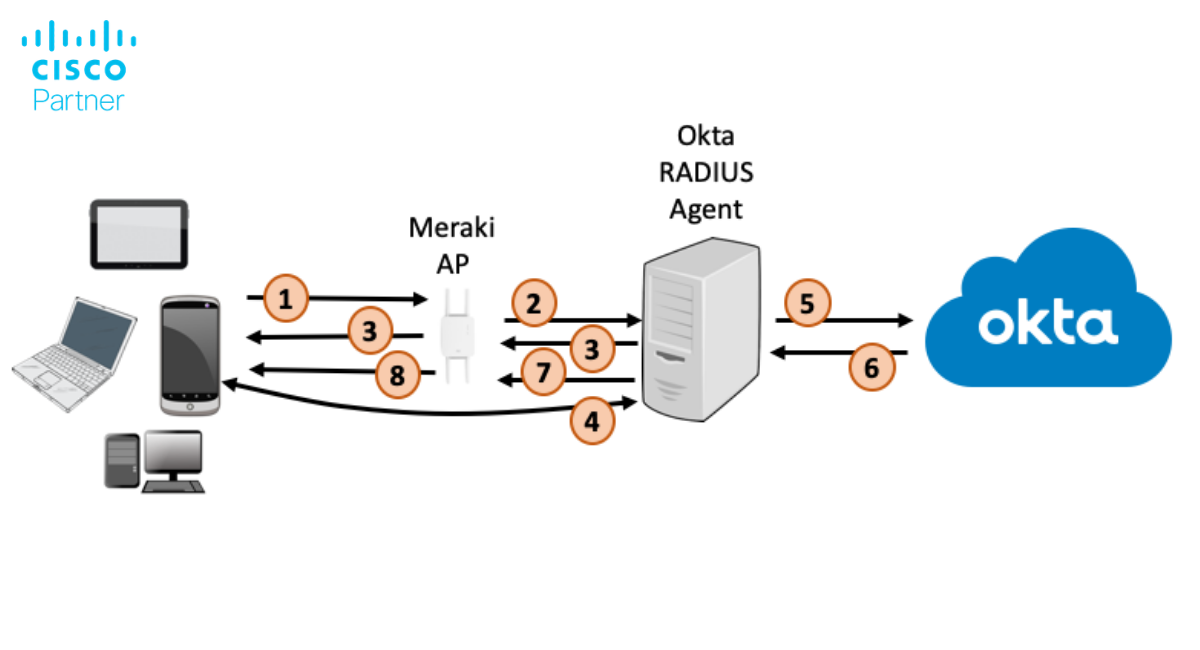
When appropriately configured, Meraki and Okta create a tight feedback loop between user identity and network access. Meraki wireless networks can be set up to authenticate users via RADIUS or SAML, pointing to Okta as the authoritative source of identity.
Here’s how it works: When a user attempts to connect to a Meraki SSID, the request is routed to Okta via a cloud-hosted RADIUS proxy such as JumpCloud, SecureW2, or Foxpass. Okta verifies the user credentials and checks for policies such as MFA enforcement or group membership. Users may be prompted for additional verification in their browser, depending on device recognition and security policies. Only after the identity has been validated does the user gain access to the network. During the Okta authentication process, a check box option such as ‘Remember me for 180 days’ may be available to enhance user convenience and session management.
Protocols like SAML and RADIUS enable this secure handshake between Meraki and Okta. Meraki’s RADIUS authentication supports dynamic VLAN assignment and policy enforcement, which lets IT teams tailor access based on user role or department. This setup also enables device posture checks, meaning only devices that meet compliance standards (e.g., up-to-date antivirus or MDM enrollment) can connect.
This integrated approach removes the risks of shared passwords and replaces them with granular control over who gets access, when, and from which devices.
The integration of Cisco Meraki and Okta brings a suite of advanced security features designed to protect wireless networks against evolving threats. One of the core strengths of this solution is its support for multi-factor authentication (MFA), which requires users to verify their identity through additional methods beyond just a password. This dramatically reduces the risk of unauthorized access, even if user credentials are compromised.
Meraki’s cloud-managed platform enables dynamic policy enforcement, allowing administrators to assign network access based on user roles, group membership, or device compliance status. Features like dynamic VLAN assignment and real-time posture checks ensure that only compliant devices and verified users are granted access to sensitive network segments. Continuous monitoring and detailed logging provide IT teams with the visibility needed to detect suspicious activity and respond quickly to potential security incidents.
By leveraging protocols such as RADIUS and SAML, organizations can enforce granular access controls and automate the onboarding and offboarding process. This not only enhances wireless security but also simplifies compliance with industry regulations and internal policies. Together, Meraki and Okta deliver a robust, future-proof solution that adapts to the changing needs of modern enterprises.
The Okta Verify app plays a pivotal role in strengthening identity-first Wi-Fi authentication. As a key component of Okta’s multi-factor authentication strategy, Okta Verify enables users to confirm their identity through push notifications, one-time passcodes, or biometric verification directly from their mobile device. This added layer of security ensures that only authorized users can access the wireless network, even if their primary credentials are compromised.
When a user attempts to connect to the Wi-Fi, Okta Verify can prompt them to approve the login attempt, providing real-time confirmation and reducing the risk of unauthorized access. The app’s seamless integration with the authentication process means users experience minimal friction—no need to remember additional passwords or carry physical security keys. For administrators, Okta Verify offers centralized management and reporting, making it easy to enforce MFA policies and monitor authentication events across the organization.
By incorporating Okta Verify into your wireless security strategy, you not only enhance protection against hackers and credential theft but also provide a user-friendly authentication method that supports both iOS and Android devices. This ensures a consistent, secure connection experience for all wireless clients, regardless of location or device type.
Improved Security
By linking Wi-Fi access to verified user identity, businesses eliminate the need for shared credentials. Okta ensures that only valid users pass through the authentication gate, and Meraki ensures that those users are segmented and monitored appropriately. MFA further hardens the connection, adding context-aware protection against credential theft.
Enhanced User Experience
From the user’s perspective, there’s less hassle. Employees log in with their regular Okta credentials, with no separate Wi-Fi passwords or certificates to manage. Reliable wifi access is essential for productivity and seamless connectivity, especially in environments where users may lack cell signal or alternative wireless connectivity. Okta’s SSO ensures smooth access to cloud services after authentication, making network entry feel like part of the broader digital workplace experience. Windows devices are fully supported, including features like Okta Verify for passwordless sign-in and Windows Hello for biometric authentication.
Operational Efficiency
IT administrators gain centralized control. Instead of managing device lists, password resets, or certificate deployments, they define access policies in Okta and push them through Meraki’s dashboard. Changes to user roles automatically affect Wi-Fi access, streamlining onboarding, offboarding, and compliance audits.
For a successful Meraki-Okta deployment, preparation is key.
Start by ensuring your Okta directory is properly synced with your internal user base. This includes confirming group structures, user attributes, and MFA policies. If you plan to use a RADIUS proxy, set up the integration ahead of time and test with a small group of users.
Next, configure Meraki SSIDs for enterprise authentication. Define access policies based on groups or roles, and align VLAN settings accordingly. Make sure your RADIUS servers and dashboards are communicating securely.
Finally, test across different environments. Validate how the solution works in both on-site and remote scenarios, especially if your users rely on VPN or remote-access tools. For users who do not have access to a phone, consider alternative MFA methods such as SMS, voice calls, or app-based codes. Monitor authentication logs in both Meraki and Okta dashboards to troubleshoot edge cases and optimize user flows.
A phased rollout often works best. Start with a pilot team, gather feedback, and adjust policies before a full deployment.
To maximize the benefits of identity-first Wi-Fi authentication with Meraki and Okta, organizations should follow a set of best practices during deployment and ongoing management. Begin with a thorough assessment of your current network infrastructure and user directory, ensuring that all user attributes and group memberships are accurately reflected in Okta. Establish clear access policies that define who can connect to which wireless networks, and align these policies with your organization’s security requirements.
Implement a phased rollout, starting with a pilot group to test the configuration and gather feedback. This approach allows you to identify and resolve any issues before expanding to the entire organization. Provide comprehensive training for both users and administrators, covering topics such as the use of the Okta Verify app, password resets, and recognizing push notifications.
Regularly review authentication logs and network access reports to monitor for unusual activity and ensure compliance with security policies. Keep your RADIUS server and Meraki dashboard settings up to date, and periodically audit user access to remove inactive accounts. By following these best practices, organizations can ensure a smooth transition to identity-first Wi-Fi, delivering a secure, scalable, and user-friendly wireless experience across all locations.
The threat of compromised credentials and insecure access points is growing. Attackers increasingly target Wi-Fi networks as easy entry points, especially when weak authentication is in place. As devices and users move more fluidly across locations, static security models no longer suffice.
Meraki and Okta provide a practical way to align wireless security with Zero Trust principles. Every login is verified. Every device is accounted for. Every session is monitored. For organizations that value agility, visibility, and security, this is the next step forward.
Struggling to manage Wi-Fi access with shared passwords or outdated certificates? It may be time to adopt identity-first authentication.
specializes in secure Meraki deployments that integrate seamlessly with Okta. From design to rollout, our Cisco-certified team can help your organization simplify its Wi-Fi security while increasing user satisfaction.
Contact Stratus Information Systems today to learn how to integrate Meraki with Okta for seamless, identity-first Wi-Fi authentication.