License delivery shouldn’t be a mystery. You place an order, provide payment information, and expect clear communication about when you’ll receive what you purchased. Yet one of the most common questions customers ask after ordering Cisco Meraki licenses is simply: “When will I get my license key?”
The anxiety is understandable. Without that license key, your new Meraki hardware sits unused. Your network refresh project stalls. Your team can’t complete the deployment they’ve been planning. And when days pass without updates, frustration builds.
This guide walks through exactly what happens after you order Meraki licenses—from the moment you click “purchase” through receiving your license key and applying it to your network. Understanding this timeline helps set proper expectations and eliminates the uncertainty that often accompanies license purchases.
Meraki licenses activate the full functionality of your network equipment. Access points, switches, security appliances, and cameras all require valid licenses to operate beyond their initial trial period. Organizations planning deployments need to know when licenses will arrive so they can coordinate installation, configuration, and cutover activities.
Delays create cascading problems. Installation teams show up on site without the licenses needed to activate equipment. IT staff must explain to executives why new hardware remains idle. Projects miss deadlines because license delivery wasn’t factored into the timeline. These issues are entirely preventable with clear communication about fulfillment processes.
The challenge stems from Meraki’s licensing model involving multiple parties. Your reseller processes the order and collects payment. Cisco fulfills the license from their systems. The license key arrives via email, which can sometimes be filtered by spam systems or missed among other messages. Understanding each step helps you know what to expect and when to follow up if something seems delayed.

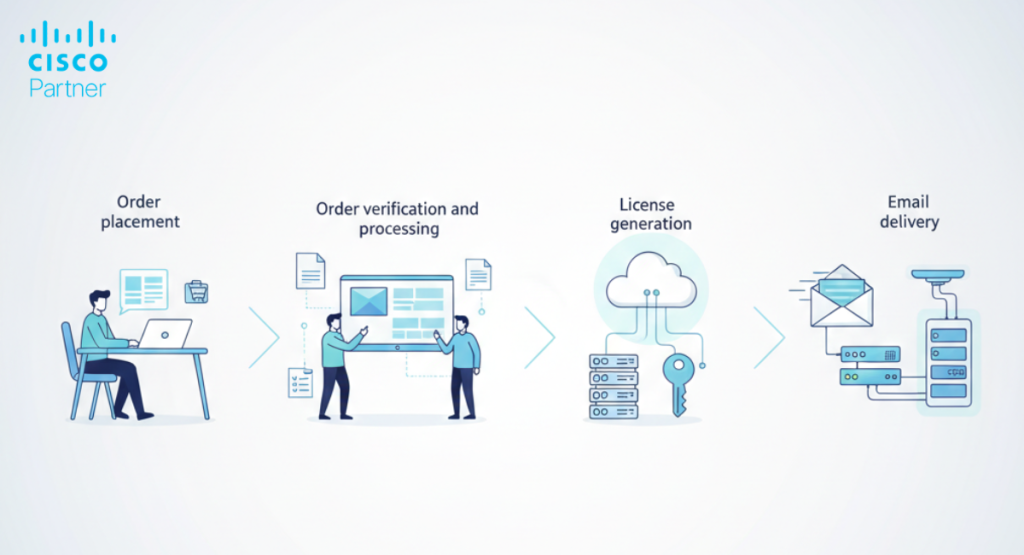
The first phase begins when you complete your purchase. Whether you order through a reseller’s e-commerce platform, work with an account executive, or submit a purchase order, this initial processing window covers several activities.
Order Verification (0-4 hours)
Your reseller verifies order details including product SKUs, quantities, and license terms. Meraki offers different license durations (1-year, 3-year, 5-year, 7-year, 10-year) and editions (Enterprise, Advanced Security) that must be specified correctly. Mismatched SKUs delay fulfillment, so this verification step prevents problems downstream.
For enterprise orders involving multiple products or complex configurations, verification may require additional time to confirm all components match the agreed-upon solution. Custom quotes with specific device-to-license mappings need careful review to ensure what’s ordered matches what was proposed.
Payment Processing (4-12 hours)
Credit card payments typically process within hours. Net-30 terms or purchase orders require invoice generation and may take longer depending on your organization’s payment approval workflows. Some resellers hold order submission to Cisco until payment clears, while others submit immediately and manage payment separately.
Government and educational institutions often have specific procurement requirements adding time to this phase. Three-way purchase order matching, budget code verification, or approval from multiple departments can extend payment processing to several business days rather than hours.
Order Submission to Cisco (12-24 hours)
Once payment is confirmed, your reseller submits the order to Cisco’s fulfillment system. This submission includes all license details—device types, quantities, license durations, and the email address where license keys should be delivered.
The submission window depends on when during the day your order is processed. Orders completed late in the business day may not submit to Cisco until the following morning. Orders placed on weekends typically don’t enter Cisco’s system until Monday. Understanding these timing realities helps set appropriate expectations.
After your reseller submits the order, Cisco’s automated licensing system generates and provisions the licenses. This phase operates largely without human intervention, which generally means consistent processing times but can occasionally result in technical delays.
License Generation (24-36 hours)
Cisco’s system creates unique license keys tied to your specific order. For organizations with existing Meraki networks, new licenses may be added to your current licensing agreement for co-termination. For new Meraki customers, the system establishes a new licensing record in Cisco’s database.
Co-termination deserves explanation since it affects license delivery timing. Organizations with existing Meraki licenses often prefer all licenses to expire on the same date, simplifying renewal management. When you add new licenses to a co-terminated agreement, Cisco prorates the cost based on remaining time until your renewal date. This calculation happens automatically but can add processing time compared to standalone license purchases.
System Processing and Validation (36-48 hours)
The licensing system validates that generated keys match ordered products, that quantities are correct, and that the license ties to the appropriate Meraki organization. For large orders involving hundreds of devices, this validation may take additional time as the system processes each individual license.
Organizations purchasing through Cisco’s Enterprise Agreement or other volume licensing programs may experience different timing as these orders flow through separate fulfillment paths. Your reseller can provide guidance on how these programs affect delivery timelines.
This is where many customers experience anxiety. The license key arrives via email, but not always immediately after Cisco completes fulfillment. Several factors influence when the email reaches your inbox.
Email Delivery (48-72 hours from order)
Cisco sends license keys to the email address specified during order submission. The email includes a license key or a link to claim licenses from the Meraki dashboard. This email comes from Cisco’s automated systems, not from your reseller, which sometimes causes confusion about where to direct questions.
The subject line typically includes “Meraki License” or similar phrasing, but exact wording varies based on license type. Some customers report these emails landing in spam folders, particularly in organizations with aggressive email filtering. Checking spam folders 48-72 hours after ordering prevents unnecessary delays.
Multiple Device Orders
Orders involving different product types may generate separate license keys. An order including both MX security appliances and MS switches might arrive as two separate emails, each containing the licenses for that product family. Large deployments sometimes see staggered email delivery as the system processes different portions of the order.
Reseller Notification
Many resellers receive copies of license delivery confirmations, allowing them to verify fulfillment and follow up if customers report non-receipt. However, relying solely on your reseller to forward license keys creates additional delay. The fastest path to receiving your license is monitoring the email address provided during order submission.
Despite typical 48-72 hour fulfillment, some orders experience delays. Knowing when and how to escalate prevents extended waits.
Check Before Escalating (First 72 Hours)
Before contacting support, verify several common issues:
If 72 hours have passed since order submission without receiving your license, it’s appropriate to contact your reseller for order status.
Contacting Your Reseller
Your reseller can check order status with Cisco and confirm whether licenses have been generated and sent. Provide your order number, purchase date, and the email address used for the order. The reseller can verify:
In some cases, resellers can request Cisco to resend license emails if initial delivery failed. This process typically takes less time than waiting for normal fulfillment since the licenses already exist in Cisco’s system.
When to Escalate to Cisco
If your reseller confirms the order was fulfilled but you still haven’t received the license email, escalating to Cisco support makes sense. Cisco can verify which email address received the license and can resend if necessary. Have your order number and the organization name associated with your Meraki dashboard ready when contacting support.

Proactive tracking prevents surprises and allows you to plan deployment activities with confidence.
Order Confirmation Email
Your reseller should send an order confirmation within hours of purchase. This confirmation includes order details and often provides an estimated fulfillment timeline. If you don’t receive an order confirmation, contact your reseller immediately as it may indicate a processing problem.
Reseller Order Tracking
Many resellers offer online portals showing order status. These portals may indicate when orders are submitted to Cisco, when fulfillment occurs, and when license emails are sent. Access to these systems varies by reseller, but asking about order tracking capabilities during purchase provides visibility throughout the fulfillment process.
Meraki Dashboard Visibility
For organizations with existing Meraki equipment, new licenses often appear in the dashboard shortly after Cisco fulfillment—sometimes before the license email arrives. Logging into your Meraki dashboard and checking the licensing section can provide early confirmation that your order has processed.
Communication with Your Account Executive
For orders placed through an account executive rather than an e-commerce platform, your sales contact should provide proactive updates on order status. At Stratus Information Systems, account executives keep customers informed throughout the fulfillment process, eliminating uncertainty about when licenses will arrive.
Understanding frequent delay causes helps you structure orders to minimize fulfillment time.
Incorrect Email Addresses
The most common delay stems from license emails being sent to addresses no one monitors. Corporate email addresses that get decommissioned, typos in email fields during ordering, or using personal email addresses that filter automated messages all create delivery problems. Double-checking the license delivery email address before submitting an order prevents this issue.
Payment Processing Delays
Orders requiring purchase order approval, budget verification, or multi-level authorization can take days or weeks to process payment. Coordinating with your purchasing department before ordering ensures payment doesn’t bottleneck fulfillment. For time-sensitive deployments, credit card purchases or pre-approved purchase orders accelerate the timeline.
Weekend and Holiday Orders
Orders placed Friday evening won’t submit to Cisco until Monday morning. Add another 48-72 hours for fulfillment, and a Friday order may not deliver licenses until Wednesday or Thursday. For deployments with hard deadlines, accounting for weekends and holidays in your timeline prevents last-minute scrambling.
Complex Co-Termination Scenarios
Organizations with multiple existing Meraki licensing agreements sometimes encounter delays when adding new licenses. Cisco’s system must determine which agreement should receive the new licenses and calculate appropriate prorations. Working with your reseller to review your current licensing structure before ordering helps identify potential complications.
Incomplete Order Information
Orders missing required details—device quantities, license terms, or organization information—can’t process until someone provides the missing data. Completing all required fields during ordering and responding quickly to any follow-up questions from your reseller prevents delays.
Smart deployment planning accounts for license delivery timing.
Hardware Lead Times
Meraki hardware typically ships faster than licenses fulfill. Access points and switches often arrive within 3-5 business days, while licenses take 3-4 business days after order submission. Planning for parallel delivery rather than assuming everything arrives together prevents deployment delays.
On-Site Installation Scheduling
If you’re coordinating with installers or implementation teams, schedule on-site work no earlier than 5 business days after submitting your license order. This buffer accounts for potential delays while preventing costly reschedules if license delivery runs late.
Multi-Phase Deployments
Large deployments involving multiple buildings or locations benefit from staggered license ordering. Order licenses for the first phase, confirm receipt, then order subsequent phases. This approach prevents large upfront orders that might experience partial fulfillment or require extensive coordination.

License fulfillment may be handled by Cisco’s automated systems, but your reseller relationship determines how smoothly the process runs.
Proactive Communication
Quality resellers don’t wait for customers to ask about order status. They provide order confirmations, fulfillment updates, and license delivery confirmations without prompting. Stratus Information Systems maintains communication throughout the fulfillment process, so customers always know where their order stands.
Expertise with Complex Orders
Orders involving co-termination, multiple device types, or enterprise agreements require resellers who understand Meraki licensing intricacies. Partners who regularly process these orders can anticipate potential issues and structure orders to minimize delays.
Responsive Support
When issues arise—missing license emails, order status questions, or fulfillment delays—you need a reseller who responds quickly with accurate information. Partners who view license sales as transactions rather than relationships often provide minimal support after purchase. Organizations seeking reliable partners benefit from working with resellers who prioritize customer experience over transaction volume.
Getting your license key is just the beginning. Applying it correctly ensures your network operates as expected.
License Application
Most Meraki licenses are added through the Meraki dashboard by entering the license key or clicking a link in the license email. The dashboard automatically associates licenses with appropriate devices based on device type. For organizations new to Meraki, claiming licenses creates your Meraki organization and establishes your dashboard access.
Verification
After applying licenses, verify that all devices show appropriate license coverage and that license expiration dates match your expectations. For co-terminated licenses, confirm that all licenses now share the same renewal date.
Documentation
Save license emails and order confirmations for your records. During renewal periods or when adding equipment, having quick access to previous license purchases helps verify your licensing history and ensures continuity.
License delivery doesn’t need to be mysterious or anxiety-inducing. Clear communication about timelines, proactive order status updates, and responsive support when issues arise create positive customer experiences even when dealing with automated fulfillment systems.
Organizations ordering Cisco Meraki licenses should expect:
These aren’t unreasonable expectations—they’re the baseline for professional service. Partners who meet these standards consistently earn long-term customer relationships. Those who treat license sales as transactions rather than opportunities to demonstrate value create the frustration that leads customers to seek alternatives.
For organizations planning Meraki deployments or renewing existing licenses, working with partners who prioritize communication and customer experience eliminates uncertainty. Questions about your order timeline or need for expedited fulfillment? Contact Stratus Information Systems to discuss your specific requirements and ensure your licenses arrive when you need them.