Cisco Meraki access points are renowned for their reliability and performance in a wide range of environments. Meraki access points are suitable for various environments including education, healthcare, and retail. Choosing between different models, such as the Meraki MR42 and MR36, can be challenging for businesses aiming to optimize their network performance. This article will delve into a detailed comparison of the MR42 and MR36, ensuring tech-savvy readers can make informed decisions that align with their specific requirements—while keeping in mind key considerations when choosing between models.

The Meraki MR42 is a high-performance Wi-Fi 5 (802.11ac) access point that provides reliable connectivity. It is designed to handle moderate to high traffic loads, making it ideal for small to medium-sized businesses. The MR42 boasts features such as 3×3 MU-MIMO, which enables simultaneous data transmission to multiple devices, and a maximum throughput of up to 1.9 Gbps.
The MR42 supports 3×3:3 MU-MIMO with beamforming technology, hardware-accelerated encryption, and band steering for optimized wireless performance. It features multiple antennas and radios to enhance coverage and support high-density deployments. The MR42 supports 802.3at/802.3af PoE, has a maximum rate of 1.5 Gbit/sec, and includes a dedicated Ethernet port for wired connectivity. It also integrates BLE (Bluetooth Low Energy) for IoT and proximity-based services. Native Active Directory authentication support is available on the MR42, providing advanced security options. Note that the MR42 reached End-of-Sale status in 2021, so organizations planning long-term deployments may want to consider newer Wi-Fi 6 models. Real-world feedback indicates the MR42 delivers more reliable performance in high-demand usage scenarios compared to the MR33.
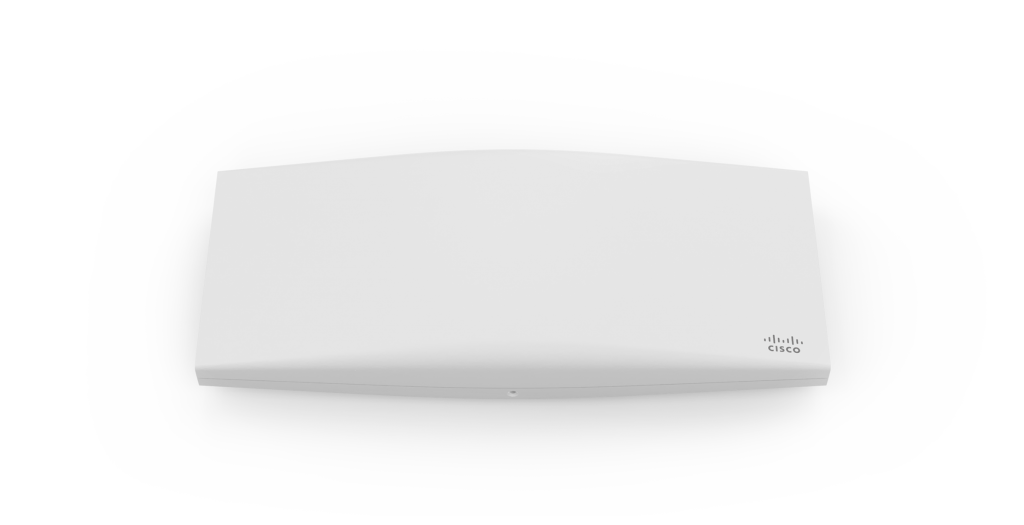
In contrast, the Meraki MR36 is a Wi-Fi 6 (802.11ax) access point that offers superior speed and efficiency. With features like 2×2 MU-MIMO and OFDMA, the MR36 can handle high-density environments effectively. It supports up to 1.7 Gbps in maximum throughput but benefits from Wi-Fi 6’s advancements, such as improved power efficiency and reduced latency, making it ideal for modern offices and high-traffic public spaces.
One major difference between these models is their Wi-Fi standard. Both the MR33 and MR42 support dual-band operation, meaning they can operate on both the 2.4 GHz and 5 GHz bands. The 5 GHz band offers faster and less congested wireless performance, making it ideal for high-speed and high-density environments. The MR42, with its Wi-Fi 5 capabilities, supports solid connectivity but lacks the latest efficiency improvements found in Wi-Fi 6. On the other hand, the MR36 leverages Wi-Fi 6 technology to provide better overall network performance, particularly in environments with numerous connected devices.
The Meraki MR42 has a maximum throughput of 1.9 Gbps, which allows it to handle regular business operations efficiently. The MR33 supports 802.3af PoE and has a maximum rate of 1.3 Gbit/sec, making it compatible with standard PoE switches and injectors. The MR33 can also be powered by means of a power injector. Its lower MSRP makes the MR33 a cost-effective solution for businesses needing a reliable but economical access point, and it is particularly suitable for small to medium offices with low-to-moderate device density per access point. The MR33 is especially suitable for small spaces where aesthetics or limited mounting space are concerns due to its compact design. The MR33 is an entry-level access point, while the MR42 is considered a step up from the entry level. The MR33 has an End-of-Support date of July 21, 2026. Additionally, the MR33 features 2×2:2 MU-MIMO with beamforming technology. Even though the Meraki MR36 maximum throughput of 1.7 Gbps might seem lower at first glance, but its Wi-Fi 6 features more than compensate for this by optimizing data flow and reducing network congestion.
The Meraki MR36’s use of OFDMA and BSS Coloring helps minimize latency, allowing for faster and more reliable data transmission. This is particularly beneficial in high-density environments where many devices are competing for bandwidth. While the MR42 performs well under moderate loads, it may struggle with higher-density usage, where the MR36’s advantages become more evident.
Wi-Fi 6 introduces features such as Target Wake Time (TWT) to help reduce power consumption and support for a higher number of concurrent device connections. Wi-Fi 6 also includes power save features as part of the 802.11e/WMM standard, enhancing energy efficiency during data transmission. Cisco Meraki access points offer features like hardware-accelerated encryption and band steering for optimized wireless performance. These enhancements make the MR36 not only more efficient but also more suitable for modern businesses needing reliable, high-capacity networks.
The MR42 can support a significant number of clients but may experience reduced performance when too many devices connect simultaneously. In comparison, the MR36’s Wi-Fi 6 technology allows it to manage more connected devices with minimal latency, making it ideal for larger offices or venues.
\For small to medium-sized businesses, the MR42 offers strong performance at an affordable price, making it a great fit for traditional office spaces or retail environments. The MR36, however, excels in high-density locations such as corporate offices, auditoriums, or conference centers where reliable and efficient connectivity for numerous devices is essential.
While both models are suited for business environments, the MR36’s enhanced capabilities make it more future-proof for companies looking to scale up their operations or adopt more device-heavy workflows.
Both the MR42 and MR36 include robust security protocols such as WPA3 encryption, which ensures secure data transmission. Both models also feature advanced wireless security capabilities, including WIDS (Wireless Intrusion Detection System) and WIPS (Wireless Intrusion Prevention System), as well as hardware-accelerated encryption for enhanced protection against wireless threats and faster, more secure data processing. However, the MR36, due to its newer Wi-Fi 6 technology, may include enhanced features such as improved encryption standards and better protection against modern cyber threats.
Managing both the MR42 and MR36 is simplified through the Cisco Meraki Dashboard. This cloud-based management tool provides centralized access control, real-time network monitoring, and intuitive troubleshooting. The MR36 may offer more detailed analytics and enhanced control options, beneficial for larger network environments.
The MR36’s capabilities include more refined options for network segmentation and secure guest access, making it more suitable for enterprises that prioritize advanced security measures.
The Meraki MR42 is typically more affordable than the MR36, making it a great option for businesses that need solid performance without a significant financial commitment. The MR36, with its higher price point, reflects the added value of its Wi-Fi 6 technology and enhanced capabilities.
While the MR42 is an excellent investment for businesses with moderate needs, the MR36’s long-term value lies in its ability to handle future network demands with ease. This makes it a wise choice for businesses that anticipate growing connectivity requirements.
Businesses must weigh budget considerations against performance needs. The MR42 offers great performance for its price, while the Meraki MR36 provides a higher ROI for those needing scalability and support for cutting-edge technology.
Both models are easy to deploy and maintain, with the Meraki Dashboard streamlining updates and management. However, the MR36’s energy-efficient Wi-Fi 6 capabilities may lead to lower long-term operational costs despite its higher initial price.
The MR33 offers cost-effectiveness for simple setups, while the MR36’s total cost is justified by its advanced features and future readiness.

The MR42 is best suited for offices, schools, and retail spaces that do not require the highest level of performance but need reliable connectivity. The MR36 is more appropriate for environments expecting higher traffic, such as corporate campuses and conference facilities.
For those looking to future-proof their network, the MR36’s Wi-Fi 6 capabilities make it a better choice, as it will support modern devices and usage patterns for years to come.
Choose the MR42 if your business requires strong, reliable performance at a lower cost. Opt for the MR36 if you need advanced features, scalability, and the benefits of Wi-Fi 6. Consulting with Stratus Informational Systems can help ensure you select the model that best fits your business environment and goals.
Both the MR42 and MR36 are excellent access points with unique strengths. The MR42 is ideal for businesses with modest network needs, while the MR36 is a stronger investment for larger, high-demand environments. For tailored advice on choosing the right Cisco Meraki access point, contact Stratus Informational Systems for expert consultation and guidance.