
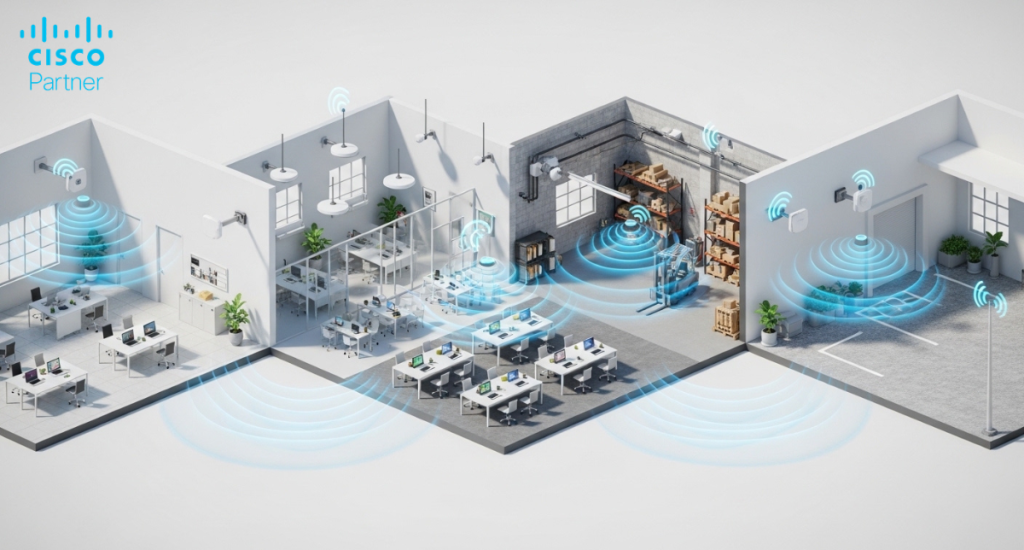
Selecting among Meraki MR models rarely comes down to picking the “fastest” access point and moving on. Wireless design lives and dies on constraints you cannot ignore: client density per cell, RF noise, wall materials, ceiling height, mounting options, and the mix of device radios in the real world. An open-plan office behaves nothing like a warehouse aisle full of reflective metal. A campus courtyard has different failure modes than a classroom. Indoor access points such as the Meraki MR36 or Meraki MR46 address controlled environments where density, roaming behavior, and airtime efficiency define success. Outdoor access points like the Meraki MR76 are weather-resistant and provide coverage that indoor units are not designed to support. Treating these models as interchangeable because they share a product family leads to unstable roaming, uneven coverage, and avoidable redesign.
Effective wireless design starts with deployment realities. Density targets, interference patterns, mounting constraints, regulatory limits, uplink capacity, and long-term growth plans all influence model selection. Antenna strategy, environmental sealing, transmit behavior, and PoE class directly affect performance and operational stability. Matching those characteristics to the environment prevents coverage gaps, airtime congestion, and expensive mid-cycle hardware swaps.
Meraki MR36 is best suited for predictable Wi-Fi 6 coverage for day-to-day business traffic, without designing for extreme concurrency. Think small offices, clinics, retail back-of-house, light manufacturing admin space, and branch sites that need stable roaming for laptops, phones, and handhelds. In these environments, the design targets clean coverage, sensible channel reuse, and minimizing co-channel interference rather than chasing headline throughput.
MR36-class deployments work well when the switching layer stays simple, and the RF plan keeps channel width conservative. That translates into fewer surprises during rollout across dozens of similar branches. You still need a disciplined SSID count, sensible minimum data rates, and a clear plan for voice devices if the site runs voice over Wi-Fi.
Meraki MR44 and Meraki MR46 are in the middle tier that many enterprise floors actually need. MR44 typically fits moderate-to-busy spaces where client count rises during peaks but does not resemble a lecture hall crush. Examples include classrooms, mid-sized corporate floors, outpatient areas, and collaboration-heavy departments. MR46 steps up when concurrency and airtime pressure become the limiting factors, especially in areas with frequent meetings, high unified communications traffic, and high device diversity.
The practical difference shows up in how much “headroom” the cell has when the environment gets loud. More spatial capacity and stronger receive performance help stabilize client experience when dozens of devices contend for airtime. Plan your uplinks and switch ports accordingly. Many mid-tier designs benefit from multi-gig uplinks and PoE budgets that leave margin for real-world cable losses and switch stack growth. MR44 and MR46 also reward consistent RF standards across sites: channel width strategy, band steering posture, and minimum bitrate baselines that keep slow clients from consuming a disproportionate share of airtime.
Meraki MR56 is well-suited for spaces where the design goal shifts from “good coverage” to “stable service under load.” Auditoriums, lecture halls, trading floors, busy cafeterias, large training rooms, and dense collaboration zones can drive high concurrent association counts and bursty traffic patterns. In these environments, raw coverage rarely fixes the issue. Capacity does. You can blanket the area with signal and still fail if airtime scheduling, channel reuse, and client distribution break down.
MR56-class designs pair best with a deliberate capacity plan: more cells, tighter channel reuse, and uplink readiness that matches the traffic profile. Keep SSID count lean and avoid configuration choices that inflate management overhead on the air. If the site runs latency-sensitive workloads, align QoS markings end-to-end and confirm that roaming behavior stays stable under load, not only during off-hours testing. MR56 works best when the design treats the RF layer like shared infrastructure, with guardrails that prevent one user population from degrading everyone else.
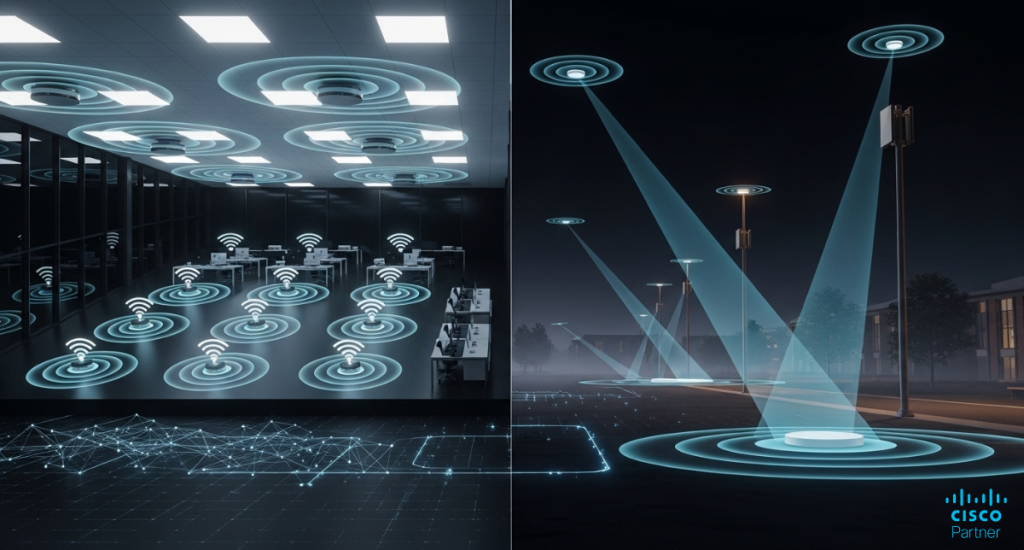
Meraki MR76 is a common choice for outdoor Wi-Fi 6, where you need a hardened platform and flexible coverage design. Typical deployments include campus quads, stadium perimeters, parking lots, loading zones, distribution yards, and exterior walkways between buildings. Outdoor design often starts with the mounting reality. You place access points on poles, exterior walls, or under eaves, then you shape coverage with antenna choices and careful channel planning.
MR76-class deployments also face tougher RF conditions. You contend with greater interference variability, reflective surfaces, seasonal foliage changes, and longer client distances. You also manage weather, temperature swings, and physical security. A rugged outdoor AP helps, but it does not replace design discipline. Use directional antennas when you want defined coverage corridors, and limit overshoot that causes co-channel interference across large outdoor areas.
Meraki MR28 typically serves smaller-scale outdoor coverage needs where you still want a purpose-built exterior device. It can fit building exteriors, small courtyards, patio areas, and light-pole mounts where you want straightforward coverage without building an extensive antenna design. MR28-style deployments shine when the goal involves targeted outdoor service for a defined space, especially when the indoor network already provides most connectivity and the outdoor link extends usability at the edges.
Compared with an MR76 approach, MR28 deployments usually have less emphasis on long-range shaping and more emphasis on clean, local coverage. That does not mean you can ignore RF planning. Outdoor cells still overlap in unpredictable ways, and the client mix can change quickly, especially near entrances where indoor and outdoor radios compete. Keep your roaming strategy consistent across the boundary zones and validate performance during typical occupancy. If the site plans outdoor expansion later, confirm that the initial MR28 placement does not “paint you into a corner” by creating channel reuse problems that become expensive to fix.
Antenna choice drives outdoor results more than many teams expect. Integrated antennas often suit compact coverage zones and simpler deployments. External antennas become important when you need to direct energy down a walkway, across a yard, or away from an area that would create interference. Directional patterns help create a usable signal where you want it and reduce bleed into neighboring cells. Omnidirectional patterns work for generalized coverage when the area does not demand shaping.
Outdoor RF planning also benefits from validation in the real environment. Predictive tools help, but reflections, elevation, and line-of-sight obstacles can distort the plan. Treat the first install as a calibration point. Validate RSSI, SNR, retransmissions, and roaming events, then adjust placement or antenna patterns early. This is also where the broader Meraki MR models lineup matters. Some outdoor variants, such as MR78, fit use cases that need different antenna flexibility or mounting profiles. For 6 GHz expansion outdoors, models like MR86 may enter the discussion, subject to regional regulatory allowances.
Outdoor access points are designed to withstand conditions that indoor APs should never face: water ingress risk, UV exposure, wind-driven debris, and larger temperature swings. Even “protected” outdoor mounting can trap humidity and cause corrosion over time. Outdoor hardware also typically requires greater attention to grounding, surge protection, and physical security. Indoor models belong indoors, full stop. Trying to stretch an indoor AP into a semi-outdoor location often creates a slow-burn failure that looks like intermittent RF problems until the hardware finally drops.
Power planning also differs. Outdoor runs can be longer, and PoE margin matters. Confirm cable quality, connector weatherproofing, and switch port budgets. Outdoor installations also frequently require enclosures, media converters, or intermediate surge protectors. Each component adds failure modes. A clean design reduces the parts count, keeps power stable, and sets realistic maintenance expectations.
Indoor design usually prioritizes capacity, airtime efficiency, and predictable roaming across many overlapping cells. Outdoor design often prioritizes reach, controlled coverage geometry, and limiting interference across large open spaces. That shifts how you pick models and how you place them. Meraki MR46 and Meraki MR56 are typically used where client concurrency shapes the experience. Meraki MR76 is well-suited for coverage zones that must withstand exposure and support larger cell footprints.
A common mistake is treating outdoor coverage like an indoor extension and leaving channels wide with high transmit power. That can increase interference and reduce real throughput. Instead, design outdoor cells with intent: narrower channels when reuse pressure rises, power levels aligned to client transmit limits, and antenna patterns that reduce unnecessary overlap. Outdoor Wi-Fi improves when you design for the clients you actually have, not the EIRP your AP can theoretically push.
Outdoor deployments run into regulatory guardrails more quickly. DFS behavior, regional transmit limits, and antenna certification rules can affect what channels you can use and how stable they remain in practice. Some environments also carry compliance requirements tied to safety, public access, or industrial operations. Plan these constraints early so the design does not depend on channels you cannot reliably hold, or antennas that complicate certification.
If your deployment spans regions, confirm that the same model and antenna plan remains valid everywhere. Global standardization can simplify operations, but only if it respects local rules. This is another reason to treat model selection as an engineering decision. It is easier to standardize intelligently than to unwind a design that looked fine on paper but breaks under the real regulatory profile.
Retail and branch environments reward repeatability. Meraki MR36 often fits sites with moderate device counts, standard SaaS usage, and light guest traffic. Move to Meraki MR44 when the branch carries heavier voice usage, more guest load, or denser client behavior in smaller floor plans. Use Meraki MR46 in branches that function as mini-campuses: training rooms, larger front-of-house spaces, or mixed clinical workflows where airtime contention is routine.
Keep the design consistent across branches. Standardize SSID count, security posture, and RF baselines. Avoid overbuilding a small site with a high-density AP if the switching and cabling cannot support the plan. A stable branch network often comes from predictable cell design and clean channel reuse, not maximum hardware class. If the branch includes outdoor waiting areas or curbside operations, consider Meraki MR28 or a rugged platform like Meraki MR76 based on mounting and exposure.
Campuses create mixed density. Classrooms and lecture halls push concurrency. Hallways and commons create roaming complexity. Dorms, gyms, and cafeterias introduce peak traffic behavior that can overwhelm mid-tier designs. Meraki MR46 works well across many campus interior spaces, and Meraki MR56 is well-suited to the highest-density zones where stability under load is critical. For modern client populations that can benefit from 6 GHz, models like MR57 may be considered, especially in spaces where additional spectrum is needed to reduce contention.
Outdoor campus connectivity often needs durable coverage across walkways, courtyards, and perimeter zones. Meraki MR76 fits many of these areas. For broader outdoor shaping or different antenna needs, MR78 can be relevant. Treat the indoor-outdoor boundary as a roaming design problem. Validate that clients do not “stick” to an outdoor cell while indoors, or bounce between cells due to mismatched power and channel plans.
Industrial sites demand a mixed strategy. Offices and control rooms behave like standard indoor enterprise spaces. Production floors and warehouses often feature reflective surfaces, high ceilings, moving obstacles, and, at times, RF noise from machinery. A common approach is to use Meraki MR46 in operational interior zones that require higher capacity and stable roaming for handheld devices. Use rugged outdoor platforms like Meraki MR76 for yard coverage, perimeter access, or exterior staging areas. Meraki MR28 can fit smaller exterior pockets where you want targeted coverage rather than broad shaping.
In distribution and logistics, wireless reliability directly impacts workflow. Validate coverage along travel paths, at loading bays, and in pick zones. Confirm that roaming does not interrupt scanner sessions. Keep channel planning conservative and avoid configurations that increase airtime overhead. If you plan to expand, design the RF layout so you can add cells without rebuilding the entire channel plan. Industrial Wi-Fi rarely fails because the AP model was “too slow.” It fails when the design ignores the physical environment.
| Environment / Constraint | Typical Priority | Common Indoor Picks | Common Outdoor Picks | Practical Notes |
| Small office, clinic, light branch | Coverage, simple scaling | Meraki MR36, Meraki MR44 | Meraki MR28 (small exterior) | Keep SSIDs limited, set consistent minimum rates |
| Mid-sized floor, classrooms, moderate density | Capacity headroom, roaming | Meraki MR44, Meraki MR46 | Meraki MR76 (campus edges) | Consider multi-gig uplinks in higher traffic areas |
| Lecture halls, auditoriums, dense collaboration | Airtime efficiency, concurrency | Meraki MR56 | Meraki MR76 (adjacent outdoor queues) | Design for smaller cells and clean channel reuse |
| Campus outdoor walkways, quads, lots | Durable coverage geometry | Indoor varies by building | Meraki MR76, MR78 | Directional antennas help control bleed and reuse |
| Warehouses and distribution centers | Mixed RF, roaming stability | Meraki MR46, Meraki MR56 (hotspots) | Meraki MR76 | Validate handheld roaming, account for reflections and height |
| Outdoor expansion with modern clients | Spectrum relief, future growth | Meraki MR57 (6 GHz capable zones) | Meraki MR86 (regional fit) | Confirm regional rules for 6 GHz and antenna choices |
Standardization makes operations easier, but only when the standard matches reality. Many organizations pick one baseline indoor model and one baseline outdoor model, then add a high-density option for specific zones. This reduces spare inventory complexity, streamlines RF tuning, and ensures consistent troubleshooting across sites. It also helps your switching layer planning. When the AP class stays predictable, you can standardize PoE budgets and uplink expectations instead of discovering constraints site by site.
Plan upgrades around use case changes, not marketing cycles. Wi-Fi 6 remains a strong foundation for many environments, but device populations evolve, and high-density areas grow. If you expect a jump in client concurrency or a move toward newer client radios, build a phased plan: upgrade the busiest areas first, validate RF and roaming behavior, then expand. Avoid mixing too many models in the same physical zone unless you have a clear RF reason. Mixed fleets can work, but they require stricter configuration discipline to maintain performance stability.
Wireless design decisions compound over time. An access point selected for convenience instead of density, antenna strategy, or uplink capacity often becomes the bottleneck two years later. The right approach is to align indoor and outdoor deployments with realistic client concurrency, roaming patterns, and environmental constraints. High-density office floors, warehouse aisles, outdoor perimeters, and campus courtyards each require different RF behavior, mounting strategy, and power planning. Treating them as interchangeable increases operational friction and troubleshooting time.Stratus Information Systems works with organizations to translate performance requirements into a practical MR architecture. That includes validating the coverage strategy, aligning switching infrastructure with radio capabilities, and building repeatable deployment standards that scale cleanly. The objective is predictable wireless performance and manageable operations across every site, not an overextended model list.