A short internet outage can feel like a minor inconvenience until it hits during peak hours. Card transactions stop. VoIP calls drop. Teams lose access to cloud apps and shared files. If customers rely on chat, booking, or support portals, revenue takes the hit fast. Most organizations now measure uptime against tighter internal targets and provider SLAs, yet a single circuit still fails more often than anyone wants to admit. A practical safety net is no longer reserved for large enterprises. Meraki cellular failover has become a realistic approach for keeping critical services reachable when wired access goes down. Done well, it strengthens business internet redundancy without turning the WAN edge into a complicated science project.
Cisco Meraki takes a straightforward approach to cellular resilience with cloud-managed components that integrate cleanly into existing networks. Cisco Meraki MG devices provide Meraki LTE backup that remains visible and controllable in the dashboard, while a Meraki 4G/5G gateway approach gives teams more options for different site types.
Here we will walk you through design patterns, a practical Meraki MG failover setup, and operational best practices for Cisco Meraki WAN failover across branch sites and larger hubs.
Stratus Information Systems can help you design a Meraki-based network continuity strategy that matches your sites and risk profile.
Many locations still run on a single broadband or DIA circuit. It works, until it does not. The causes of the outage vary, and they are rarely convenient. Fiber cuts happen near construction zones. Last-mile equipment fails at the street cabinet. A provider pushes a maintenance change that impacts routing. Sometimes the circuit stays up, but performance collapses and becomes unusable for voice or VPN. That last situation can be the most frustrating because simple “link up” monitoring misses the problem. Critical workloads demand more than a basic connection indicator. They need stable latency, acceptable packet loss, and predictable throughput. A single-circuit design rarely meets those expectations across all regions and providers.
Older backup strategies often depend on tools that do not fit modern operations. A secondary DSL line may exist without monitoring, but switching to it requires manual intervention. Some sites rely on ad hoc phone tethering, which introduces security risks and rarely scales beyond a few laptops. Others pay for a second circuit but do not implement health checks that trigger failover in time. The result is a long outage window, followed by a scramble. Support teams get flooded with tickets, while engineers work through a checklist under pressure. The biggest weakness is inconsistency. Each site ends up with its own workaround. That breaks standard operating procedures and makes troubleshooting harder across the fleet.

Cellular uses infrastructure that is physically different from that of most wired circuits. That diversity matters. Even if the same provider supplies both services, the path and failure modes can be different. Cellular also reaches sites quickly. You can deploy a gateway in days rather than waiting weeks for a new circuit, especially in leased buildings or remote areas. The key is using cellular with guardrails. Without rules, costs can spike during extended outages or heavy traffic. With the right design, cellular becomes a controlled layer of business internet redundancy that activates when needed, prioritizes the right applications, and returns to normal operation without drama.
Think of Cisco Meraki MG as a purpose-built cellular gateway designed for managed WAN environments. It bridges LTE or 5G connectivity to an upstream security appliance, most commonly a Meraki MX firewall. The value is not “internet over cellular.” Teams have been doing that for years. The value is visibility, policy alignment, and consistent operations from the same dashboard used across the rest of the network. You can place the MG where signal quality is best, which is often not the same location as the rack. That flexibility matters in basements, warehouses, and dense urban buildings. A cleaner signal improves stability when failover triggers, and stability is the entire point.
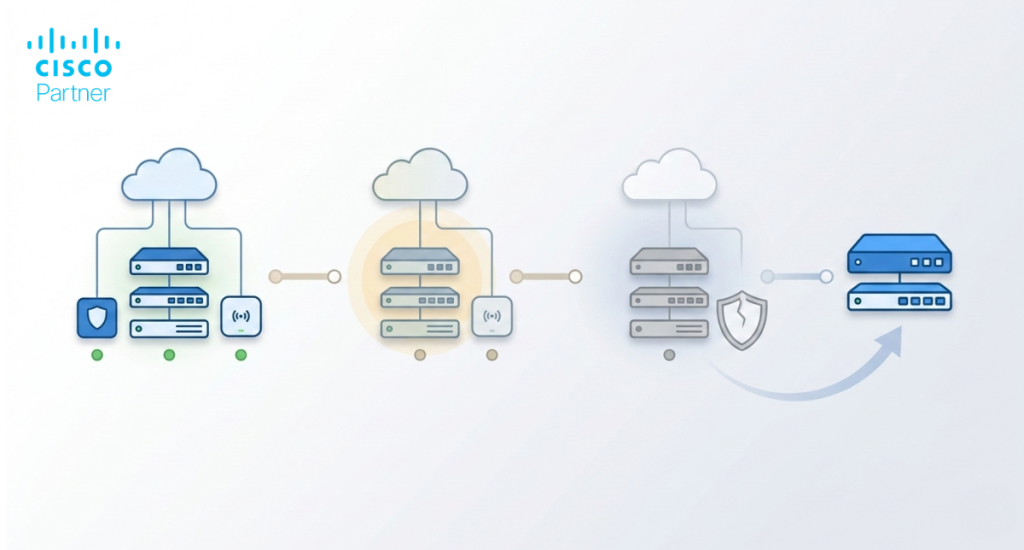
Meraki LTE backup works best when treated as part of the wider WAN strategy. In a typical deployment, the Meraki MG connects to the MX firewall as a secondary uplink. The MX monitors WAN health using probes and performance thresholds. When the primary wired circuit fails, or becomes unusable, the MX shifts traffic to cellular based on your policies. When the primary circuit returns to stable service, the MX can revert automatically. This is where Cisco Meraki WAN failover becomes practical. It reduces manual intervention and shortens the outage window. The same approach applies to a small office and to a multi-site organization, as long as the rules are consistent and tested.
A Meraki 4G/5G gateway can play different roles based on the site’s purpose. For a kiosk, pop-up store, or micro site, cellular may be the primary path. For a branch, it often functions as backup, protecting business operations when the wired circuit fails. For regional hubs, it can serve as a tertiary path to support continuity during major incidents. It can also help during circuit turn-ups, when the wired service is delayed but the office still needs to operate. These options directly support branch office connectivity, especially in regions where reliable wired service is difficult or slow to deliver.
The simplest and most common pattern is a single-wired WAN plus cellular backup. The wired circuit connects to the MX on WAN1. The MG provides the cellular path and connects as WAN2 or via the supported failover method for your model and firmware. The MX monitors health, not only link state. You define probes that reflect business reality, such as reachability to core SaaS endpoints, DNS stability, or VPN headends. When conditions cross the threshold, the MX shifts traffic to cellular. This is a clean implementation of LTE failover for Meraki MX appliances, and it becomes even more effective when the Meraki MG failover setup includes traffic shaping rules that keep nonessential traffic off the cellular link.
Some branches need more than a single circuit plus cellular. A dual-wired WAN with different providers reduces the frequency of switching to cellular, which can help control cost. The MG becomes the third path, activated only when both wired circuits fail or degrade. This pattern improves branch office connectivity in areas with unstable access providers. It also helps with maintenance windows. You can shift traffic during planned provider work while keeping the site online. The most important step is defining policy. Decide what traffic may use cellular when the third path activates. Voice, VPN, and critical SaaS should get priority. Bulk updates and guest traffic should be blocked or severely limited.
Some organizations prefer a centralized breakout for security inspection or consistent policy enforcement. In this design, branches route traffic through a hub or data center. If the hub loses its primary WAN, the impact spreads quickly because many sites depend on it. Meraki cellular failover at the hub reduces the blast radius. Cellular may not provide full bandwidth for every site, but it can keep critical services reachable while the primary circuit is restored. It can also maintain VPN control-plane stability, which reduces recovery time when the wired circuit returns. This is a practical continuity tool for shared services, especially when the hub supports authentication, logging, or key internal applications.
Pop-up sites often have one problem: time. Waiting for wired service is not acceptable. In these cases, a Meraki 4G/5G gateway can act as the primary link on day one. The site still benefits from dashboard visibility, consistent policy, and remote troubleshooting. When a wired circuit becomes available later, cellular can shift into backup mode without replacing the entire design. This model works well for seasonal retail, construction site offices, event venues, and temporary operations centers. It also creates a repeatable deployment method, which is the real productivity gain for engineering teams supporting many locations.
Start with the physical reality of the site. Where is the best cellular signal? It might be near a window, a higher floor, or a different room from the network rack. Plan antenna placement early, and treat it as a performance factor, not an afterthought. Cabling between MG and MX should be stable and secure, and you should label it like any other WAN path. IP addressing choices should fit the site standard, even if the MG uses NAT behind the scenes. Keep consistency across sites where possible. It speeds troubleshooting when you can look at a diagram and recognize the pattern immediately.
A strong Cisco Meraki WAN failover configuration is built on meaningful health signals. Avoid relying only on “link up” status. Define performance classes and probe targets that reflect the services users actually need. If the site relies on voice, measure latency and loss thresholds that match VoIP tolerance. If critical apps are cloud-based, include probe targets that represent those destinations. Configure uplink preferences, then align firewall rules and traffic shaping so cellular stays focused on what matters. This is also the stage where you prevent surprises. If a guest SSID exists, it should not consume your cellular plan during an outage.
Testing is not a one-time task. It is a repeatable operational requirement. Start by simulating the most common failure modes: unplug WAN1, introduce high packet loss, or block DNS resolution. Measure failover time and confirm that priority applications remain usable. Then test the return to primary service. The “back to normal” phase often exposes issues, such as asymmetric routing, session timeouts, or poor probe selection. Use dashboard event logs and uplink views to confirm that Meraki cellular failover triggered for the reasons you expected, not due to random noise. Document what you learned and apply the same test steps to other sites.

Cellular is excellent for continuity, but it requires discipline. During Meraki LTE backup, the goal is not to run everything. The goal is to keep essential operations moving until the wired circuit returns. Traffic shaping helps you do that. Prioritize voice, VPN, authentication traffic, and core SaaS. Limit or block streaming media, large downloads, OS updates, and guest access. This is also where you define what “essential” means for each site. A call center branch has different needs than a warehouse. Treat shaping rules as part of site design, not a generic template that fits all locations.
Carrier selection should match the site reality. Coverage maps help, but real signal testing is better. In some buildings, one carrier performs well and another struggles. Consider both plan structure and raw speed. You want predictable billing during rare outages, not surprise charges during a long incident. Use dashboard usage views to establish normal baselines, then create alerts for abnormal spikes. That turns cellular from a blind backup into a monitored resource. It also helps finance teams feel comfortable with the strategy, since you can show clear controls and visibility.
The best continuity designs scale because they stay consistent. Use tagging, templates, and site standards so your approach does not drift. Standardization is not the enemy of flexibility. It is what allows flexibility to exist without chaos. When you apply network continuity solutions across a fleet, create a baseline policy set, then allow site-specific overrides for unique requirements. Centralize naming conventions for uplinks, alerts, and dashboards so your NOC can interpret events quickly. If you manage dozens or hundreds of locations, this discipline becomes the difference between controlled operations and constant firefighting.
Visibility matters most during the first minutes of an outage. Alerts should tell your team what changed, where it changed, and what the system did next. Configure notifications for uplink status changes, performance degradation, and failover events. Tie these alerts to on-call workflows so incidents are acknowledged quickly. Use dashboards to track cellular utilization, latency, and packet loss during failover. This helps you spot problems early, such as a saturated cellular sector or poor signal quality that reduces throughput right when you need it most.
Treat every outage as data. After service is restored, review what happened. How long did the failover take? Which applications struggled on cellular? Did nonessential traffic consume bandwidth? Did the site return to primary service cleanly? This review should lead to tuning, not blame. Small adjustments to probe targets, traffic shaping, and alert thresholds often deliver significant improvements. Over time, this creates a continuity system that becomes more reliable with each event.
Cellular failover protects WAN access, but continuity requires more than WAN. Power matters. Local switching matters. Hardware spares matter. Documented recovery steps matter. Meraki cellular failover should be one pillar inside a broader approach to resilience. When you combine cellular with UPS power, clean cabling, standardized device configs, and tested incident procedures, you create operational confidence. That is what people mean by real continuity. It is not a single device. It is a complete, rehearsed method that keeps teams productive during failure conditions.
One frequent error is assuming cellular will “work anywhere” without signal planning. Poor antenna placement can turn a backup design into a false sense of security. Another common mistake is using the same carrier for both wired and cellular connectivity in a region where that provider owns the last mile. If the provider suffers a regional incident, both paths can fail together. Teams also skip testing. They deploy, then assume it is fine. When the outage occurs, they discover that the probe targets were too generic or that traffic shaping was never applied. Default policies can send large volumes of traffic over LTE during an outage, which creates cost spikes and performance collapse.
Design mistakes show up in multi-site environments. Some teams roll out Cisco Meraki MG gateways without distinguishing branch roles. A retail site and a medical clinic should not have the same failover policy. Another mistake is ignoring application reality. If the critical workload is voice and payment processing, shaping rules must reflect that. Finally, teams sometimes treat cellular as a “set and forget” feature. Cellular plans, coverage, and usage patterns change. A short quarterly review catches these issues before they become incidents.

Keeping a site online during an outage comes down to preparation and repeatability. The strongest designs start with clear failover triggers, traffic rules that protect critical apps, and a test routine that proves the backup path works before a real incident. Cellular backup fits well with that model because it provides a separate path to the internet and can be deployed quickly across many locations. When it is set up with sensible shaping and monitoring, the backup link protects productivity instead of becoming a cost surprise.
Stratus Information Systems supports teams that want a reliable failover design they can roll out site by site. This includes right-sizing the cellular approach for each location, validating health checks, and tuning policies to keep essential services stable when the primary circuit fails. For organizations expanding into new regions or standardizing branch buildouts, that consistency is often the difference between a calm failover event and a messy scramble.