The rapid shift toward a distributed workforce has changed the way IT teams design secure access. Employees expect to connect from homes, coworking spaces, and satellite locations without delays or extra steps. At the same time, security requirements continue to rise. Legacy VPN concentrators, unmanaged home routers, and inconsistent policies place pressure on IT operations. Supporting a growing remote workforce introduces more sessions, more devices, and more potential failure points.
A reliable remote work solution must balance security, performance, and ease of use. Cisco Meraki offers a strong foundation by combining cloud-based visibility with streamlined configurations. Its architecture gives IT the control needed to protect applications while remote employees gain consistent access from any location. This approach fits well with the operational demands of a modern remote workforce.
Meraki appliances, cloud management tools, and the Meraki remote access VPN provide the building blocks for secure connectivity outside the corporate perimeter. These capabilities support several secure remote work solutions, ranging from individual client VPN access to dedicated setups for heavy workloads. Cisco Meraki office model extends corporate standards to small satellite environments.
This article explores how to design, deploy, and operate a complete solution for remote workers using Meraki technology.
Remote employees need dependable access to internal applications, SaaS platforms, and collaboration systems. Performance and stability rank high on their priority list. They also need safe access methods that do not slow down productivity. Remote work solutions must support identity controls, protected tunnels, and consistent security policies.
The goal is to give employees a familiar experience, whether they sit inside a corporate building or work from home. This drives the need for technology that can maintain uniform policies across all locations without extra complexity for the user.
Many organizations originally expanded remote access in a hurry. This created gaps in visibility and policy enforcement. Unmanaged home routers, inconsistent split-tunneling choices, and outdated VPN profiles lead to unpredictable behavior. Shadow IT activity becomes more common when apps are difficult to reach or slow to load.
These weaknesses increase the time spent troubleshooting. The lack of consistent standards also makes it harder to investigate incidents or identify misconfigurations. A structured approach becomes essential as remote access grows beyond a small percentage of staff.
Meraki brings VPN, cloud-based oversight, and centralized policy management into a single platform. The architecture simplifies the support of remote connections at scale. IT teams gain live insight into performance, alerts, and user activity. This makes Meraki a strong fit for remote worker solutions of varying complexity.
Meraki designs can support simple client VPN access or more advanced setups, such as a Cisco home office for power users. A Meraki office deployment extends corporate reliability to a small remote site, bringing consistent performance and policy control.
The Meraki remote access VPN delivers a clear and manageable approach for encrypted connectivity. It supports user authentication, traffic segmentation, and flexible routing choices. IT administrators can configure access policies, assign groups, and manage user sessions through the dashboard.
This VPN design suits users who rely on personal devices or who log in from unmanaged home networks. The client configuration process remains simple, and the traffic passes through secure tunnels that enforce corporate standards.
Some employees need more than client VPN access. Executives, engineers, or teams working with sensitive data may require a stronger link to corporate resources. A Meraki office deployment can extend the corporate network into a remote location.
The appliance, once powered on and connected to the internet, checks into the dashboard and downloads its configuration. Auto-VPN then links the office directly to headquarters. Employees gain the same level of access as they would in a branch building, while devices in the home or micro office benefit from secure segmentation.
Meraki cloud management allows network administrators to monitor remote sessions, adjust policies, and troubleshoot from a single interface. Administrators can view connection logs, VPN performance, and device information without visiting remote locations.
This centralized control simplifies life for IT teams. Problems that once required remote diagnostics or manual data gathering now appear in one place.
A dedicated Cisco home office becomes valuable when users handle sensitive information or need a more stable connection than a laptop-based VPN can provide. Executives, patient-care staff, contact center teams, or developers may fall into this category.
A full Meraki office experience at home gives these users corporate-level Wi-Fi, policy enforcement, segmentation, and performance. This design reduces risk and improves productivity in high-demand roles.
Choosing the proper mix of MX, MR, or MS equipment depends on user needs. A common approach uses an MX appliance behind the ISP modem. The user gains a secure tunnel into the corporate environment and a separate SSID for personal devices.
An MR access point can support better wireless coverage and dedicated corporate SSIDs. VLANs help separate corporate traffic from home devices, improving security. These choices form a lightweight but reliable remote workspace.
Meraki policies allow IT to isolate home devices from corporate networks while giving remote employees access to required applications. QoS settings help prioritize collaboration tools and voice applications.
This ensures that users experience consistent performance during calls and meetings. The goal is to recreate the stability of a corporate office while keeping the setup manageable for IT.
IT teams should categorize users based on their needs. Casual home workers may rely on standard VPN profiles. Full-time remote employees may require stronger device policies. Power users may need hardware-based connectivity.
These tiers help align each group with the correct remote worker solutions.
Meraki supports integrations with identity providers for authentication. Group policies enforce different access levels. A user who works with sensitive data receives strict controls. A general office worker receives broader but safe access.
Segmentation limits exposure and reduces risk when endpoints sit outside a corporate building.
The VPN onboarding process includes installing client profiles, distributing credentials, and testing initial connectivity. Documentation helps users set up their devices quickly.
Ensuring that users meet basic security requirements protects both the device and the network.
Meraki monitoring tools show active sessions, bandwidth consumption, authentication failures, and usage patterns across the remote workforce. Administrators can identify problems quickly.
Remote packet captures, event logs, and alerts support fast troubleshooting when issues occur.
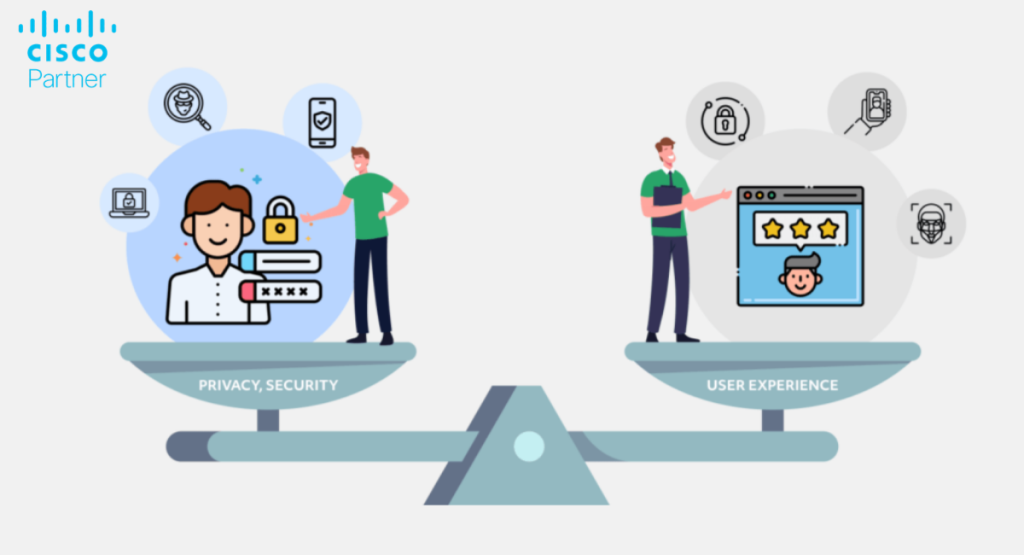
Users want fast access, and IT wants strong security. Meraki supports both through least privilege, correct tunnel configurations, and endpoint controls.
Simple workflows help reduce confusion while maintaining secure access to corporate apps.
Voice and collaboration apps demand stable connectivity. QoS helps prioritize business traffic over background usage. This improves call quality even in busy home networks.
These choices strengthen the overall remote work solution and reduce complaints around audio and video performance.
The Meraki dashboard shows on-site devices, branch equipment, and home-office connections in one place.
This visibility helps IT teams plan upgrades, address congestion, and understand long-term performance trends.
Standard kits reduce onboarding time. Hardware bundles, VPN profiles, and reference documents give employees a predictable setup.
This approach works well when supporting a large remote workforce.
Onboarding includes shipping the kit, validating connectivity, assigning policies, and reviewing baseline tests.
Offboarding removes access, retrieves equipment, and updates asset records. Consistent workflows reduce confusion and improve compliance.
Meraki analytics surface trends in usage, performance, and user issues. IT teams can improve remote work solutions based on real data.
This leads to better designs, fewer support tickets, and a more stable environment.
Meraki gives organizations a strong foundation for secure remote work. The combination of the Meraki remote access VPN, Cisco home office kits, and scalable Meraki office designs supports long-term remote work solutions. This model provides the visibility, security, and flexibility needed to maintain consistent performance across dispersed teams.
A structured approach helps organizations meet the demands of a growing remote workforce. The Meraki ecosystem supports this effort by centralizing control and enforcing standards across a wide range of devices and locations.
Talk to Stratus Information Systems about a Meraki-based remote work solution tailored to your teams. We can help with design, implementation, and refinement to keep your remote employees productive and secure.