
Cisco Meraki attracts strong opinions because it compresses many operational tasks into a cloud-managed workflow. Some engineers see that and assume “less control.” Others treat it as a shortcut for teams that do not run complex networks. Neither view holds up for long once Meraki is deployed across real sites with real constraints.
Misconceptions also spread because people compare Meraki to a single point in time. They remember an early rollout, an outdated licensing experience, or a deployment that lacked governance. This article clears up the most common myths: control planes versus data planes, repeatability versus drift, and how Meraki networking behaves under real operational pressure.
This myth usually starts with the interface. Meraki makes core operations approachable, so people assume the platform must be shallow. That logic flips reality on its head. Large networks fail more often due to inconsistent execution than a lack of features. Meraki’s appeal in bigger environments comes from uniformity at scale, not from stripping out capability.
In enterprise wireless networking and multi-site security designs, Meraki is frequently used to standardize branch deployments, reduce the time required to bring new locations online, and keep policy enforcement predictable across hundreds or thousands of devices. Standardisation affects security posture, troubleshooting speed, and audit readiness. A mature Meraki deployment looks less like “easy mode” and more like a controlled operating model.
The operational impact becomes obvious when the organization grows. Site count increases faster than staff. Change windows shrink. One-off exceptions accumulate. Meraki helps teams hold a consistent baseline across networks, then apply controlled variance where it is justified. That’s a scalability feature in practice, not a small business trait.
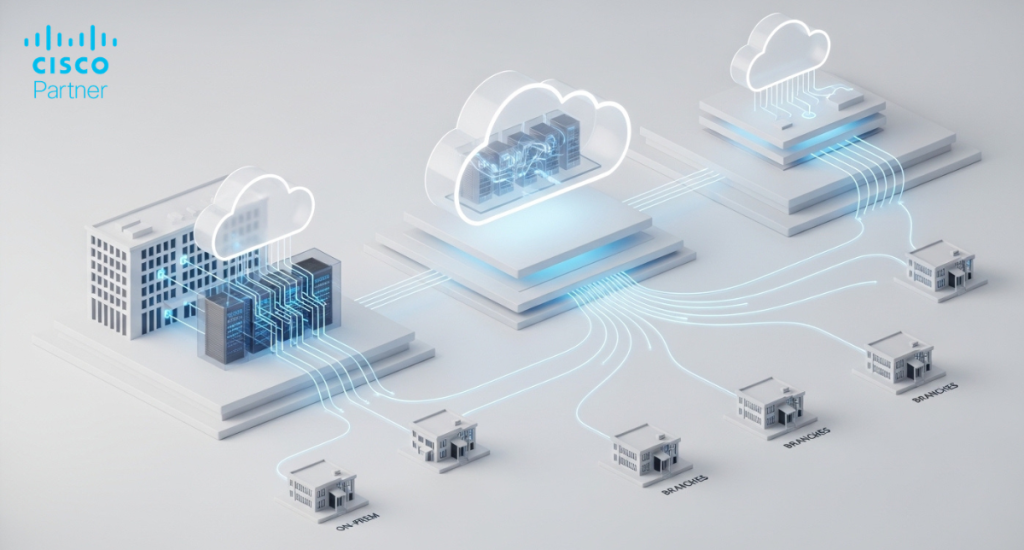
Cloud-managed platforms often get criticized as “exposed” because people assume the cloud is where traffic flows. With Meraki, the cloud is the management plane. User traffic stays on the local network path according to the design. The dashboard is where configuration, monitoring, and control live. That separation matters. It changes the threat model and the operational model.
Cisco cloud security design principles show up in how devices authenticate and how administrators gain access. Devices establish encrypted communications with the cloud and authenticate using certificates. Administrative access is controlled through roles, authentication controls such as SSO (Single Sign-On) and MFA (Multi-Factor Authentication), and auditability. That means the management channel is not “a web page controlling the network.” It is a controlled control plane with authentication, encryption, and logging.
Security is also about reducing mistakes. A traditional environment that relies on scattered device access can end up with inconsistent ACLs, outdated firmware, undocumented changes, and fragile exception handling. Meraki’s advantage is that it supports consistent review and consistent enforcement across devices. In practice, Cisco cloud security becomes visible in the day-to-day reality: fewer places to misconfigure, clearer change history, and easier verification of what is actually deployed.
The misconception arises from associating advanced networking with heavy reliance on CLI (Command-Line Interface)-based configuration. Meraki intentionally reduces the need for device-by-device command work, which is valuable for operational consistency. That does not mean Meraki features are limited. It means the workflow is different.
In real deployments, advanced needs usually revolve around segmentation, SD-WAN policy, identity controls, visibility, and secure remote operations. Meraki addresses these with centrally managed configuration, policy objects, group policies, and consistent telemetry across networks. The capability is expressed through a model, not through dozens of device-specific commands that vary between platforms and engineers.
Engineers should still demand precision. The right question is not “Does it have feature X?” The right question is “Can it enforce the behavior we need, reliably, across the network footprint?” Meraki features matter when they reduce ambiguity. A strong example is policy consistency. When every site uses the same port profiles, VLAN patterns, and security baselines, troubleshooting becomes faster. Incident response becomes more predictable. Audits become easier. Those outcomes are “advanced” in the sense that they are hard to achieve with ad-hoc configuration practices.
Zero-touch provisioning gets misunderstood because it sounds like automation without oversight. In reality, zero-touch provisioning is only as controlled as the process behind it. The device does not “decide” anything. It checks in, retrieves the organization-defined configuration, and applies it. That is control, provided you designed the baseline properly.
In disciplined environments, zero-touch provisioning is an operational advantage. It allows IT to pre-stage networks, define templates, apply standardized policies, and ship hardware to a site with clear installation steps. The device comes online with the intended configuration already defined. That reduces the window where a site exists in a partially configured state, which is a common source of security and availability gaps.
The trade-off is governance. If you treat templates and baseline policies casually, you can quickly propagate errors. Mature teams treat provisioning workflows like software release workflows. They validate configurations in pilot environments, review changes, and use staged rollouts. When those practices are in place, zero-touch provisioning improves control by reducing variation caused by manual, local changes.

Meraki licensing causes strong reactions because it is explicit. It ties management, updates, and support into a subscription model. If a team expects purely perpetual licensing with optional maintenance, Meraki licensing can feel unfamiliar. The better comparison is total operational cost over time, not line-by-line entitlement labels.
Meraki licensing typically covers the ongoing capabilities that are often handled through a patchwork of tools in other environments. That includes access to the management platform, feature updates, firmware lifecycle, and vendor support. In operational terms, it removes the silent cost of managing compatibility, maintaining multiple tooling layers, and coordinating upgrades across inconsistent devices.
Rigid models become a problem when they block change. Meraki’s model tends to do the opposite. It encourages standardization and predictable lifecycle planning. That matters when teams run multi-year modernization programs or operate under strict audit requirements. The financial question should be framed around the cost of inconsistency. If your environment spends too much time chasing drift, troubleshooting site-to-site differences, or coordinating brittle upgrades, a licensing model that supports continuous consistency can reduce overall spend, even if the subscription line item is visible.
Hybrid IT environments are the norm. Organizations keep data centers, add cloud workloads, run SaaS, and operate remote sites with varying connectivity quality. The misconception here is that Meraki only works in “cloud-first” greenfield deployments. In practice, Meraki is frequently used at the operational layer across mixed infrastructures because it standardizes edge behavior and site operations.
Hybrid design usually requires three things: consistent segmentation, reliable WAN policy, and visibility that does not collapse across multiple tools. Meraki networking can provide that operational consistency at the edge while the organization keeps specialized systems where they are needed. A common pattern is to use Meraki at branches and campuses for standardized access, SD-WAN, and security policy while integrating with upstream systems for core routing, data center segmentation, and identity services.
Meraki also supports API-driven workflows, which is often a requirement in hybrid IT environments. Automation helps teams validate configuration baselines, manage inventory at scale, and generate operational reporting across sites. The key point is architectural: hybrid environments fail when each site becomes its own snowflake. Meraki’s value is that it makes repeatability easier, even while the upstream environment remains diverse.
Calling Meraki “just a dashboard” misses what the dashboard represents. It is not merely a UI. It is the control plane and the operational model. Devices enforce locally. Policies apply at the access and edge layers. The dashboard provides centralized management and visibility, enabling teams to operate the environment consistently.
This distinction matters when people worry about centralized failure. A centralized dashboard does not mean a centralized forwarding path. Branch traffic does not hairpin to the cloud for policy decisions. The device enforces the policy locally. The management plane remains available for configuration, monitoring, and troubleshooting. That’s why Meraki can scale operationally across distributed networks. The enforcement points stay close to users and workloads, while visibility stays consistent.
This model also changes accountability. Traditional networks can hide operational drift because changes happen in multiple places, by multiple methods, across multiple tools. Meraki’s approach makes change history easier to track and configuration baselines easier to review. That is why many organizations adopt Meraki networking not as an aesthetic preference, but as a response to operational reality.

If your team is evaluating Meraki or already running it, you can test these claims with simple operational checks rather than opinions. Start with repeatability. Compare two similar sites and review how quickly you can verify configuration parity across VLANs, port profiles, SSIDs, and security rules. If parity is hard to validate, the environment is already drifting, regardless of the platform.
Next, assess change safety. Look at who can change what, how changes are logged, and how rollouts are staged. Meraki becomes more valuable as governance becomes stronger, because the platform amplifies whatever standards exist. This is where Meraki features deliver measurable value. Templates, inventory controls, role-based administration, and consistent firmware practices reduce operational risk.
Finally, assess hybrid integration. Identify the systems that must remain in place, such as identity services, SIEM tooling, or specialized routing. Then evaluate how Meraki networking fits into that model without forcing an all-or-nothing migration. The strongest Meraki deployments treat the platform as a consistent operational layer that complements existing systems. That is often the difference between a clean rollout and a frustrating one.
The myths around Meraki persist because people judge it from the outside. Meraki compresses operational complexity into a consistent model, so it can look deceptively simple. In reality, it rewards clean design and disciplined execution. That is why Meraki networking can scale in environments that demand standardization, consistent security posture, and predictable day-to-day operations. It also explains why arguments that focus only on UI or only on licensing often miss the real issue: operational drift and inconsistent enforcement.If your team is planning a refresh, a multi-site rollout, or a security posture upgrade, treat Meraki as an architectural choice grounded in operational behavior. Evaluate Cisco cloud security controls in the management plane, validate how Meraki features support repeatable deployments, and assess how zero-touch provisioning fits into your governance model. Stratus Information Systems can help you assess Meraki architecture against real network and security requirements, then design a rollout plan that prioritizes control, consistency, and long-term maintainability.


