Switching becomes “real” the moment a network grows past a single closet. New VLANs appear. VoIP and cameras compete for PoE. A warehouse adds handheld scanners. A campus adds more IDF closets. Then the trouble starts: inconsistent port settings, trunks that allow everything, uplinks that run hot, and a support team that spends more time hunting drift than improving performance.
Meraki MS series gives teams a consistent switching platform that is built for scale and daily operations, not one-off installs. Cisco Meraki MS switches also fit naturally into environments that need consistent standards across many sites, as configuration and visibility remain centralized. This guide focuses only on MS switches and how to select, place, and operate them with purpose. You will see where VLAN management, link aggregation, and stackable switches fit, plus how to choose between Layer 2 and Layer 3 switches in a Meraki design.
If you want a clean model that scales without constant rework, Stratus Information Systems can help you standardize your MS approach and turn it into a repeatable rollout playbook.
Use this as a role map, not a shopping list. The “right” choice depends on the job the switch is doing and what the site needs for ports, PoE, and uplinks.
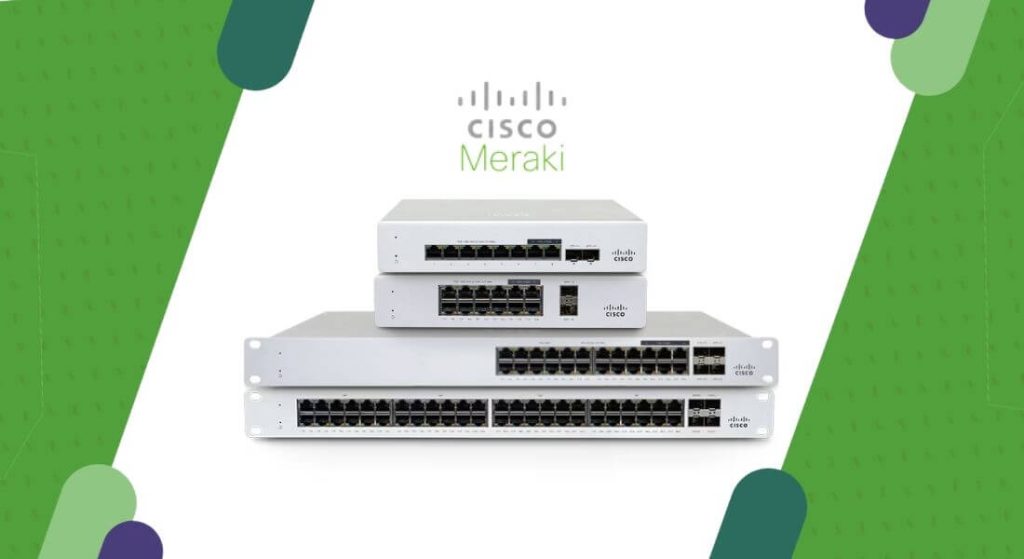
| MS Family (Typical) | Common Placement | Typical Role | Why Teams Choose It | What To Confirm Before Buying |
| MS130 / MS150 | Branch closets, campus edge | Access switching | Solid access layer with clean operations for everyday sites | PoE budget, port count, uplink type, closet growth plan |
| MS210 / MS225 | Larger closets, light distribution | Access plus light aggregation | More flexibility for multi-closet sites and heavier access needs | Uplink capacity, redundancy plan, stacking strategy |
| MS425 | Distribution layer | Aggregation | High-throughput aggregation for many access switches | Fiber uplink plan, link aggregation design, routing boundary |
| MS450 | Core or high-end aggregation | Core aggregation | High uplink capacity for core designs and large distribution blocks | Core redundancy, failure domains, operational ownership |
One practical note: switch families and options evolve, but the placement logic stays stable. Start with role, then size ports and uplinks to match reality. Also, check out the Stratus Information Comparison Guides for more information.
A strong MS deployment starts with roles. Model selection should come after you define what the switch must do in the topology.
Access switches connect the things people notice. Phones. Laptops. Printers. Badge readers. Cameras. IoT. This is where mistakes show up as broken service, and it is where standards matter most. If you have an inconsistent access port configuration, you will see it immediately in the support volume.
The best access layer design is boring by design. Standardize port profiles by device class. Create consistent VLAN and voice VLAN rules. Define how you handle guest, IoT, and corporate segmentation. Then enforce it. With managed Ethernet switches, the goal is not to create an endless set of custom ports. The goal is to remove decision-making from routine work. When a camera gets patched into a port, the port should already be “camera-ready” because the profile defines the behavior.
You also want to plan for growth in the access layer. Most sites add endpoints over time, not fewer. A closet that looks “fine” today can become the bottleneck next year if you buy too close to the edge on port count, PoE, or uplinks.
Distribution is where many access switches converge. It is the layer that determines if a multi-closet site feels stable or fragile. This is also where teams often discover they underbuilt redundancy. One uplink fails, and half the building goes dark. Or the uplink is fine, but it is saturated all day, creating “random” application issues.
Meraki distribution design benefits from clarity. Decide where routing boundaries live. Decide how you handle redundant paths. Decide how many closets a distribution block supports. Then pick the distribution switch family that supports those uplinks and that growth. This is where link aggregation often becomes useful, because you want both capacity and resilience between layers.
Not every environment needs a formal core. But if you are running a campus or a large multi-building environment, a clean core can reduce change risk and improve stability. Core design is less about “big switches” and more about predictable failure domains, predictable routing behavior, and clear ownership.
If your network keeps expanding, the core becomes the place where you decide how upgrades and changes roll through the environment. When core design is intentional, it is easier to grow. When core design is accidental, every new project feels like a gamble.
Teams often treat Layer 3 switching as a default upgrade. That is rarely the best reason. The real question is: where does routing reduce risk and improve operations?
Layer 2 at the access layer is common because it keeps the edge simple. In many designs, access switches carry VLANs upstream, and routing occurs at a distribution layer or at the security edge. This can be a clean approach when you have consistent uplinks and a stable routing boundary. It also keeps troubleshooting straightforward for support teams that primarily handle endpoint issues.
Layer 2 can also reduce the blast radius of configuration changes in some environments. If you keep routing concentrated in fewer places, you avoid a situation where dozens of closets have unique routing decisions that drift over time.
Layer 3 at the distribution layer often improves stability in larger sites. It can shrink broadcast domains, reduce unnecessary L2 extension, and make failover behavior more predictable. In practical terms, it reduces the number of “mystery issues” that are really symptoms of large L2 domains.
Layer 3 switching only works well when IP planning and standards are disciplined. You need consistent SVI patterns, consistent routing logic, and a clear plan for redundancy. If you do not maintain that consistency, you can end up with a mix of routing approaches that slows troubleshooting.
A common compromise pattern in enterprise environments is Layer 2 at access, Layer 3 at distribution, and routed uplinks to the WAN edge or core. That keeps endpoint configuration simple and keeps routing decisions centralized enough to stay maintainable.
VLAN management is where large environments either stay clean or slowly collapse into exceptions. The goal is to limit complexity while still meeting business needs for segmentation and security.
Start with a small, universal VLAN set that exists everywhere. For example, corporate users, voice, guest, and IoT. Keep the IDs consistent across sites. Consistent numbering saves time and reduces mistakes. When a support technician sees VLAN 20 on a port, they should know what it represents without opening a spreadsheet.
Next, define how you handle site-specific VLANs. Some sites will always have unique requirements, such as manufacturing devices or specialized camera networks. The key is to treat those as controlled exceptions. Document them, label them clearly, and keep them out of the baseline template if they are not truly universal. This helps avoid accidental trunk sprawl.
Finally, control your trunks. Avoid “allow all VLANs” as a long-term habit. It is convenient early on, then painful later. Trunk allowed lists are a basic control that reduces risk and keeps failure domains smaller. They also make audits and troubleshooting easier because the environment matches intent.
Link aggregation is valuable when you need both capacity and resilience between two fixed points. In Meraki switching, the most common practical use is uplinks between access and distribution, or between distribution and core. It can also be useful when uplink ports are limited and you need to combine multiple physical links into a predictable logical path.
The trap is using link aggregation as a default without confirming the topology supports it cleanly. Aggregation should not be deployed because it feels “more enterprise.” It should be deployed because the failure mode is acceptable and the operational behavior is predictable. If a link fails, you want the network to degrade gracefully. If a switch fails, you want the design to handle that without forcing a full redesign.
Another trap is confusing link aggregation with redundancy planning. Aggregation can help, but it is not the whole plan. True resilience still requires diversity, such as redundant upstream devices, redundant paths, and clean power planning.
Stackable switches can make closets easier to manage, but only when the stacking strategy aligns with operational reality. The right time to stack is when a group of switches shares the same role, failure domain, and operational owner. In that scenario, stacking can reduce management overhead and make port expansion easier.
Stacking becomes less useful when devices that should not share risk are stacked. If the business cannot tolerate one closet event affecting too many endpoints, you need to think carefully about how large the stack should be and what it supports. Stacking is not “free.” It changes the way failure impacts the site.
A strong approach is to define standard closet “modules.” For example, a two-switch or three-switch stack for a typical office floor, with a consistent uplink layout and consistent port mapping. That makes rollouts repeatable and makes troubleshooting faster, because technicians see the same pattern everywhere.
In modern environments, managed Ethernet switches are no longer optional. They are the foundation for segmentation, visibility, and control. In switching projects, most organizations do not lose time because they lack features. They lose time because they lack consistency.
Management value shows up during incidents. A port flaps, and you need to know why. A VLAN mismatch occurs, and you need to see it fast. A closet uplink saturates, and you need to confirm the traffic profile. These are operational moments that determine uptime.
The Meraki cloud-managed switches model supports this by centralizing visibility and enabling repeatable configuration review. That supports scaling across sites because engineers do not need to relearn each closet. The environment behaves like a system.
Branch sites typically require clean segmentation, sufficient PoE for phones and access points, and stable uplinks to the WAN edge. The best branch switching designs standardize port roles and keep VLANs predictable. Branch sites also benefit from consistent naming and tagging standards, because support often happens remotely.
For branch closets, the most common error is underbuilding uplinks. A small office can still generate heavy traffic if it relies on cloud apps, video calls, and real-time services. Treat uplinks as part of the branch standard, not as an afterthought.
Campus switching needs repeatability. A closet standard should define stack size, uplink strategy, and port profile patterns. When a campus has many closets, it also needs a clean distribution design. That is where uplink capacity, link aggregation, and routing boundaries matter most.
Campus sites are also where configuration drift shows up quickly. One closet becomes “special.” Another gets a temporary VLAN. Those choices multiply. The fix is governance and consistent templates, plus a disciplined method for exceptions.
Distribution is the layer that stabilizes the rest of the network. If distribution is weak, users experience “random” problems that are really predictable outcomes of saturation or poor redundancy. The distribution design should clearly define which VLANs are routed there, how uplinks are built, and how failover behaves.
This is also where you decide how the environment grows. A distribution block that cannot expand cleanly will force redesigns later. Plan for the next wave of closets, not only today.
A lineup becomes “easy” when operations are disciplined. Here is what that looks like in practice.
Define a switch naming standard that encodes location and role. Define a VLAN ID standard. Define trunk policies. Define port profiles. Then enforce them with a process that makes it hard to deviate by accident. If you rely on memory, drift will win.
Next, build a change method that matches your scale. Even a correct change can create issues if it is rolled out too fast. Large environments benefit from staged rollouts and a simple validation checklist that support teams can follow.
Finally, document the closet blueprint. A good blueprint includes stacking rules, uplink layouts, allowed VLAN lists, and port profile mapping. This is not busywork. It is how you keep scaling without compounding complexity.
If you want help turning standards into a rollout system, Stratus Information Systems can help build a practical MS switching blueprint and a repeatable deployment plan.
The most common mistakes are VLAN and trunk sprawl. “Allow everything” feels fast until you need to debug a routing or segmentation issue. A close second is inconsistent port profiles, which force support teams to treat every incident like a new puzzle.
Another common issue is building access closets without a clear uplink strategy. When a site grows, uplinks become the limiting factor. Uplink planning is part of the access design, not separate from it.
Finally, many teams treat stacking and link aggregation as generic best practices rather than role-based tools. Use them where they fit your failure domains and operational ownership. If the design is not easy to explain, it probably will not be easy to operate.

The best Meraki switching environments share a simple trait. They are designed like products, not patched like projects. The teams know where access ends, where distribution begins, and how changes flow through the system.
If you want help building that blueprint, Stratus Information Systems can help you choose the right Cisco Meraki MS switches for each layer, define a clean standard for stack design, and create repeatable templates that support scale without drift.
A strong Meraki MS deployment does not succeed because of a single feature choice. It succeeds because the switching layer is treated as an operational system, not a collection of ports. When access, aggregation, and core roles are clearly defined, day-to-day work becomes predictable. VLAN management stays readable, uplink behavior is consistent, and failure domains are understood before something breaks.
Long-term success also depends on repeatability. Standard closet designs, documented port profiles, and a clear approach to link aggregation and stacking prevent “one-off” fixes from becoming permanent problems. When a new site opens or an existing site expands, the switch design should already exist. The only variable should be scale, not structure. This is where cloud-managed switches deliver their real value, because standards are enforced through process rather than memory.
Stratus Information Systems helps organizations turn Cisco Meraki MS switches into a durable switching platform. That includes defining access and distribution roles, validating Layer 2 and Layer 3 boundaries, sizing PoE and uplinks correctly, and building operational guardrails that keep large environments clean over time. The result is a switching layer that supports growth without adding friction, and a network team that spends less time correcting mistakes and more time delivering reliable connectivity.